What is microlearning? Examples & best practices
Learn what microlearning is, how it compares with traditional training, examples, how to measure it, and where AI fits in.


Valamis
Microlearning is a way of teaching and training employees in ways that take little time but ultimately reach the intended goal.
In this guide, you will learn about microlearning, what makes it effective, and how to implement it successfully in your organization.
Discover:
- What is microlearning?
- Microlearning vs traditional learning
- Benefits of microlearning
- Challenges of microlearning
- Microlearning examples
- Principles and best practices of microlearning
- How to measure microlearning effectiveness
- AI microlearning
- How Valamis supports microlearning
- Frequently asked questions
What is microlearning?
Microlearning is an approach to learning new information in small chunks at a time. Typically, microlearning sessions are under ten minutes and can take as little as one minute to complete.
Microlearning theory
The whole concept of microlearning is based on the Hermann Ebbinghaus forgetting curve.
In the mid-1880s, Hermann Ebbinghaus became the first person to create a scientific approach to study and classify memory and introduce the world to concepts like the learning curve and forgetting curve.
During his studies, he tested subjects on their memory of sets of inconsequential, erroneous sounds and syllables. Throughout these trials, he began assessing the capabilities and function of memory in his subjects.
Ebbinghaus noted that memory does not stay consistent throughout trials. Memory can increase, decrease, and back again many times.
Of course, this also depends on not only the subject matter being learned but also the methods in which it is learned. These methods and studies also correspond to his studies on forgetting, and ultimately his “forgetting curve.”
This also led to the discovery of memory ‘savings.’ Memory saving refers to knowledge once held at the top of the mind, in complete (or at least relatively complete) accuracy, and the retention of the information thereafter.
He found that strictly memorized information can be recalled much more easily after learning it again, even after a significant time without using it.
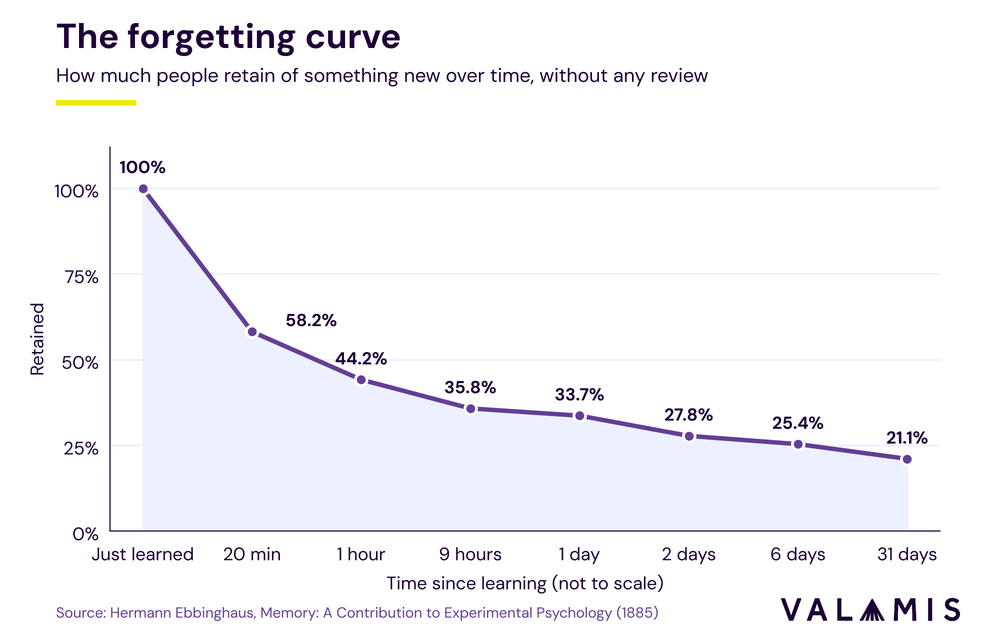
As the Ebbinghaus Forgetting Curve demonstrates, people typically lose 80% of the knowledge they learn within a month.
When people learn large amounts of information, they do retain it for a certain amount of time. However, if that information isn’t considered important to the tasks at hand, the knowledge tends to degrade over time.
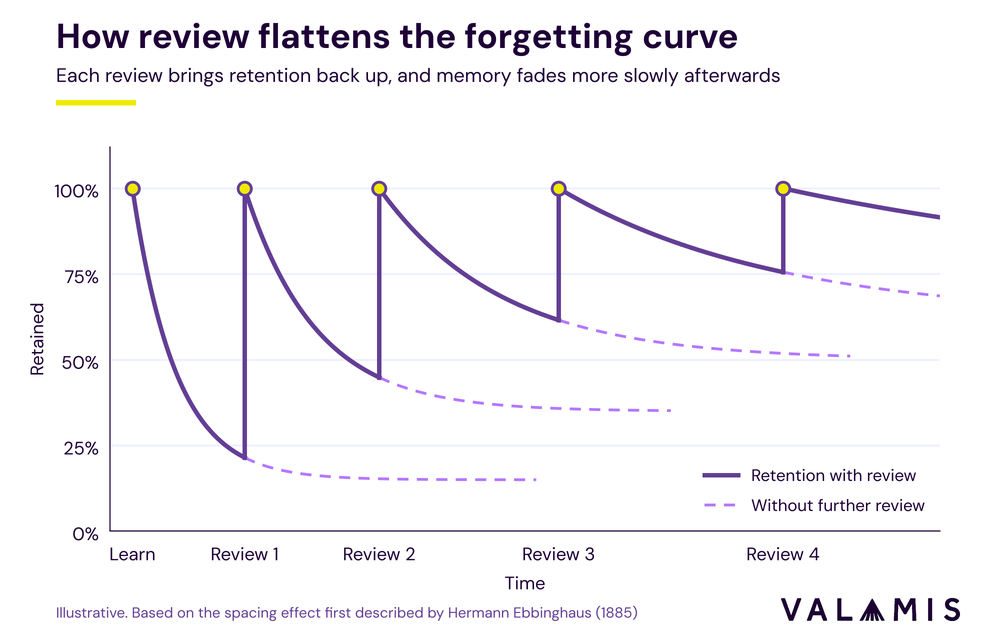
The microlearning concept can be used to tackle this issue. Splitting the content into small pieces and recalling different parts of it over time can help improve knowledge retention and productivity.
In Ebbinghaus’ memory retention graph, shown below, you can see that when someone first learns something, they retain all of that information. As the days pass, memory retention begins to drop. But as you keep reviewing information, you retain more and more of it.
Microlearning can really improve on-the-job training because employees will learn in a short period of time, and without disrupting their daily tasks. It is possible because microlearning works with the brain to prioritize information that may be more relevant to a daily workflow.
Microlearning vs traditional learning: what is the difference?
Microlearning teaches one thing in just a few minutes, usually at the moment your employee needs it. Traditional learning covers a whole topic through longer sessions, such as a workshop or an online course via your LMS, which means people need to set more time aside for it.
| Microlearning | Traditional learning | |
|---|---|---|
| Lesson length | 1 to 10 minutes per unit | 30 minutes to a full day or more |
| Core focus | One objective, skill, or task per unit | Several related objectives, built up across the course |
| Delivery format | Short videos, quizzes, flashcards, infographics, checklists | Classroom sessions, workshops, webinars, longer e-learning courses |
| Flexibility | Fits into a break, a commute, or the minute before a task | Needs a dedicated block of time, even when self-paced |
| Best used for | Product and software updates, compliance refreshers, reinforcing earlier training, quick reference | New or complex skills, in-depth understanding, practice with feedback |
Which one should you choose?
For most organizations, the answer is both. Traditional learning gives people a solid foundation, and microlearning helps keep that information from fading over time.
Onboarding is a good example. A new hire might spend two days in a structured induction, followed by a three-minute refresher each week for their first 90 days. The induction gives them the full picture, while the short follow-ups bring back the parts they might otherwise have forgotten by week three.
That said, some skills will always need the longer format. Leading a difficult conversation or operating a new production line, for example, takes feedback and time to get right.

Make AI work for you: a simple guide
Insights, hints, and tips on where to start and what to do next. Perfect for organizations looking for direction.
Learn moreBenefits of microlearning
1. Requires less time to consume the content
The #1 reason employees say they are not engaging in workplace learning is because they don’t have the time.
The main point behind microlearning is that it’s quick. At the very most, it takes about ten minutes.
With all the tasks employees are expected to perform- the less time they have to spend in training, the better. In short, employees still learn extra skills for their jobs, but without taking the time they can’t afford to do so.
Microlearning is how you will learn parts of your job in small bits, although with reduced time investments, and additional benefits that employees can use every day.
2. Increases learners’ engagement
Even people with great attention spans can struggle to remain engaged in long learning sessions. However, when people know that their learning or training will take only a few moments, it’s much easier for them to sit through.
Most people are wired to engage with new information for shorter, rather than longer, periods of time. Microlearning caters to this and keeps employees engaged.
3. Improves knowledge retention
As we mentioned, knowledge is more likely to be retained when we recall it over and over again.
Microlearning supports self-directed lifelong learning, as short activities can be easily integrated into everyday activities.
Small learning steps, with small chunks of information, can be used for learning in between and on-demand. In this way microlearning enables individuals to stay up-to-date in today’s knowledge society. Small injections of information to review what was learned help to reinforce knowledge, and memory.
Microlearning allows constant training, with the knowledge that is retained over time.
4. Enables learning on the go (mobile learning)
Because microlearning relies on small, bite-sized training sessions, it’s easy to make it accessible for any device- not just computers.
Larger training courses can be difficult for employees to keep up with. They may need to pause in the middle of a course. That means they might lose their place, or forget previous information and have to backtrack before resuming the rest of the course.
Microlearning works in synergy with mobile learning so that you can learn on the go. Short, bite-sized lessons make it easy to fit into a busy schedule. Learn (nearly) anywhere, any time.
5. Supports self-paced learning
People all learn differently, and microlearning allows people to find a way of learning that works for them. Rather than having to conform to a rigid, structured course of learning, they can find a flexible solution in microlearning. Employees can learn at their own pace, whether it’s a subject they excel in or one they need to take more time to master.
If an employee needs to review a certain piece of information, they don’t delay the rest of the learning course. That certain piece of information is the majority or the entirety of the short training course.
6. Enables personalized learning
Traditional training and learning courses can be difficult for employees to get through because they often contain information that isn’t specifically relevant to the employee’s role.
Microlearning allows you to construct your learning paths with short, informative pieces of learning, which don’t incorporate extraneous information.
Also, it makes it easier to rotate and recommend different pieces for different roles, giving people flexible and personalized learning paths.
Each microlearning course has a targeted focus on one specific item. It also means employees don’t waste time sifting through a large course to find the one or two sections they need.
Challenges of microlearning
1. It takes work and resources to maintain
One of the biggest myths about microlearning is that it is easy to create and maintain learning materials. Unfortunately, it isn’t true.
On the employer’s side, microlearning programs can take time, resources, and plenty of effort to maintain.
You may already have plenty of courses and training materials at your disposal. And just simply splitting them into smaller segments isn’t always effective.
You need to take time to plan out your microlearning modules and make sure they’re relevant for the employees using them.
This can also become complicated because you need to make sure that each session makes sense on its own, and can fit into a greater, sequential part of learning (to make sense with courses that come before and after it).
Another point to remember is that you will need to periodically update your microlearning content as technology and business procedures change over time (and sometimes very rapidly).
2. Scaling personalized content
Personalizing millions of pieces of content so that they are relevant to every individual person can be extremely tedious or even impossible.
Because microlearning courses are very short pieces, it means that a full, traditional course could be split into many dozens of microlearning courses.
For the entirety of a company’s training materials, that could ultimately result in thousands of different modules or even much more.
Going through all this information, personalizing it, and directing it to the right individuals can be extremely difficult.
Instructional designers need to figure out how to organize that information, and direct it to the individuals it’s relevant to.

Discover Valamis mobile learning
Deliver learning in the flow of work with a mobile-first experience your people will actually use.
EXPLORE MOBILE LEARNING3. Accessibility problem
If just splitting the large course into short microlearning chunks isn’t an easy task, imagine how difficult it is to make it accessible for people with disabilities.
It’s still a large task for instructional designers and requires specific knowledge and technologies.
Designers need to make sure that the courses are formatted and optimized according to accessibility standards and best practices.
4. Lack of time to invest
Ultimately, some employees are just in high demand and incredibly short on time, no matter what.
These employees may still have time to research small issues that need to be resolved on their own.
However, it can also be quite a struggle for them to find time throughout their day (no matter how accessible the courses are) to participate in mandated microlearning courses.
If employees struggle to find time to follow a microlearning course, it’s also fairly likely that they can’t find the extra time to independently research even small tasks that would make their jobs easier.
Microlearning examples
1. Microcopy
Short, targeted, highly contextual messages or hints, to help users learn.
Examples:
- Error messages
- Contact form explainers
- eCommerce hints
2. Microlearning videos
Short, focused videos that are designed to meet a specific learning outcome. Microlearning videos can be designed to be: A standalone nugget that offers a specific learning takeaway. A part of a longer learning path.
Examples:
- Explainer videos
- Brief & interactive videos
- Micro-lectures
- Whiteboard animations
- Kinetic text-based animations
3. Microlearning apps or mobile apps
Apps that give you micro-lessons, on-the-go
Examples:
- Youtube
- Headspace
- Lasting
- Word of the day
- TED
4. Micro-challenges and games
Learning that is scored at the end, that can include an award, benefits, badges, notoriety, or other incentives for taking part or achieving a high score.
Examples:
- Multiple question quizzes
- Polls, flashcards
- Question & responses
- Simulations
- Learner recordings to answer questions
5. Infographics
Infographics (and often iconic, focusing on key points and numerical values) are graphic visual representations of information, data, or knowledge.
Examples:
- Statistical infographics
- Informational infographics
- Timeline infographics
- Process infographics
- Geographic infographics
- Comparison infographics
- Hierarchical infographics
- List infographics
6. Social media
Social media is full of short content, which makes it a natural source of microlearning. By following the right people and communities, employees can pick up useful tips and industry updates in small pieces.
Internal channels can work the same way, acting as a community of practice where colleagues share what they have learned with each other.
Examples:
- LinkedIn posts and newsletters from industry experts
- Threads on X
- Reddit communities
- Short videos on YouTube or Instagram
- Tips and updates shared in internal channels such as Slack or Microsoft Teams
Principles and best practices of microlearning
1. Define if it’s a good fit
Microlearning can be a great tool, but it’s not necessarily suited to every subject matter.
Some tasks are very complex, and can’t be squeezed into a segment under ten minutes.
Likewise, there are certain tasks that are nearly impossible to teach from an e-course, textbook, or slideshow. These tasks require in-person or on-the-job training, which is infeasible to complete in such short, condensed segments.
However, it can still be a very good complimentary training approach.
2. Rework or reuse existing courses
You can ease the workload of creating an entirely new microlearning curriculum if you already have training courses and materials in place.
Some parts of your existing training courses can be split into smaller segments ‘as-is’ and used, as long as they make sense. Or, other parts can be reworked to fit a microlearning structure.
3. Use gamification mechanics
Using gamification mechanics and techniques can turn your microlearning courses into a ‘game’ per-se.
It gives your employees the same feelings of achievement and satisfaction in completing a goal that they might receive when they complete a level in a game.
This can mean that you award digital badges after they complete a set of microlearning courses on a certain subject, or allow for displays of points and status through the company.
While these ‘rewards’ are intangible, they do give employees a boost for their accomplishments, and give employees incentive to continue their microlearning. Or you can choose to award monetary bonuses, extra time off, or certificates (such as learner of the month) when employees complete courses.
4. Use short videos and other interactive assets
One of the best things about microlearning is that it boosts engagement. However, you can enhance your microlearning program even further by including attention grabbing elements like videos and quizzes.
The great thing about videos is that it brings our visual and auditory senses together, which of course, grabs greater attention from viewers.
Keep the videos short, as with the rest of your microlearning content. The shorter the video is, the more engaging and memorable it is. Just make sure you include all the relevant information in an appropriate time frame.
5. Don’t forget to add recurring content
Do you remember the main concept from the Ebbinghaus studies?
Recalling the studied materials over time will help people retain them for a longer period of time.
At the end of a series of microlearning modules, or at the end of a shorter microlearning segment, include tools for employees to review what they’ve learned.
This can be a quiz at the end of a series of segments or a slide with bullet points of the main takeaways from the course. Or, you can choose to include references to a previous learning module in those that come afterward. Either way, it’s a good idea to refresh employees’ memories.
6. Provide access anytime, on any device
Microlearning is so attractive to employees because it doesn’t require them to be chained to their desktop at work to complete it.
As such, it’s important to create microlearning materials that are available on any device, and especially on smartphones and tablets.
Make sure there are no restrictions that prevent employees from being able to access these resources whenever they get the time.
If the only way people can access microlearning courses is on their work desktop computer, it doesn’t carry the same benefits.
7. Encourage social and collaborative learning
Social learning and collaborative learning can be some of your biggest allies when you implement a microlearning program in your organization (see the links to the guides for further information).
Both of these methods of learning encourage people to learn and grow their skills from people around them. While social learning focuses more highly on imitation (seeing positive behaviors in others and attempting to replicate them), collaborative learning focuses more on brainstorming with peers, seeing their perspectives, and learning as a result.
Allowing for discussion and even comments on microlearning modules can engage employees, motivate them more, and even alert you to knowledge gaps that need to be filled in.
How do you measure microlearning effectiveness?
The best measure is whether people still remember what they learned a few weeks later, and whether they are using it in their work. Completion rates are the easiest metric to report on, but almost everyone can finish a three-minute module, so a high completion rate might not tell you much on its own.
A good place to start is the Kirkpatrick model, the four-level framework that some L&D teams will already use to evaluate training. It works just as well for short formats, as long as you adapt how you measure each level.
| Level | What it tells you | How to measure it for microlearning |
|---|---|---|
| Reaction | Did employees find it useful? | Add a quick one-tap rating at the end of each unit |
| Learning | Did they take it in, and does it last? | Ask the same question again after 7 and 30 days, and compare the scores |
| Behavior | Are they doing things differently? | Look for fewer process errors, and use manager feedback |
| Results | Did the business metric move? | Track measures such as time to competence, support tickets, or safety incidents |
Which metrics matter most?
It helps to start with the business problem you are trying to solve and work back to the learning data from there.
If the goal is faster onboarding, for example, the number that counts is how long new hires take to reach the expected standard.
If you want to know whether your microlearning is helping employees on the job, look at repeat visits. When people come back to a unit without being prompted, it is working as on-the-job support, while a unit nobody revisits may be answering a question people do not have.
It is also worth checking where people drop off. If most people leave a two-minute video at around the 1:20 mark, take a closer look at what comes after that point.
Whatever you decide to measure, record a baseline before you launch. Without one, you might be able to show that people used the content, but not that anything changed as a result.
AI microlearning
AI microlearning uses AI to create, personalize, or schedule short learning units. It can save your L&D team a lot of time in four main areas.
Creating content faster
AI tools can take material you already have, such as slide decks, PDFs, or video transcripts, and turn it into short lessons, summaries, and quiz questions. That means your team can spend its time reviewing and refining content, instead of starting every unit from a blank page.
It also makes updates far simpler. When a process changes, you can regenerate the affected units much more quickly than you could rebuild them by hand.
Personalizing learning
Recommendation engines can match each person with the most relevant units, based on their role, current skills, and past activity. So a new sales hire and a sales manager with ten years of experience can log in to the same LMS and see quite different suggestions.
Timing the review
The forgetting curve is the reason microlearning works in the first place, and AI can make spaced repetition more precise. Rather than putting everyone on the same fixed schedule, adaptive systems bring a question back sooner when someone gets it wrong, and leave it longer when they get it right.
Translation for global teams
For organizations with teams across several countries, AI translation makes it much quicker to get a new unit to every language group. Glossary controls help keep product names and technical terms consistent from one language to the next.
Does AI microlearning still need human input?
Yes. AI writes fluently even when it gets things wrong, so a subject matter expert should review every AI-generated unit, especially in compliance and safety training, where an incorrect answer can have real consequences.
AI also cannot decide what is worth teaching in the first place. That judgment comes from understanding the business problem, and it should stay with your L&D team.
How does Valamis support microlearning?
With Valamis, microlearning sits alongside the rest of your training, from onboarding to compliance and skills development.
Your team can turn existing videos and PDFs into short, tracked lessons with Valamis Studio. AI drafts lesson content from your PDFs and generates summaries and quiz questions from the lesson text, so your subject matter experts review rather than start from scratch.
Intelligent, skills-based recommendations suggest the next unit based on each person’s role and skills, while analytics bring skills data, assessment results, and learning activity together so you can see where the gaps are by role, team, or location.
Frequently asked questions
Is microlearning effective?
Yes, for reinforcing knowledge and supporting people while they work, especially when units are revisited over time. It is less effective for teaching complex skills from scratch, which need longer practice and feedback.
How long should a microlearning module be?
Long enough to cover one objective. Most are somewhere between 2 and 7 minutes. If a module runs to 15 minutes because it covers two goals, split it in two before you start trimming.
Can microlearning replace traditional training?
Rarely on its own. It works best alongside longer formats: traditional training builds the foundation, and microlearning keeps it fresh and gives people quick answers on the job.
What are the disadvantages of microlearning?
Units that do not connect can leave people with scattered facts and no wider understanding. Short content also needs regular updates, and it suits complex, hands-on skills poorly. The challenges section above covers each of these.
Do you need a separate microlearning platform?
Usually not. If your LMS supports mobile delivery, short formats, and spaced quizzes, keeping microlearning there means all your reporting stays in one place.
What are some examples of microlearning at work?
A three-minute video on a new product feature watched before a sales call. A weekly five-question compliance quiz. A safety checklist opened on a phone at the start of a shift.
Make every short lesson count
Turn your existing videos and PDFs into tracked lessons, and see how microlearning moves skills across your organization.