What is an Learning Record Store (LRS) and why does it matter for L&D?
Learn what Learning Record (LRS) is and what it enables. Discover 4 key steps on how to implement it and how to choose the right vendor.


Valamis
Data is increasingly becoming a competitive advantage across the business world.
Learning record store (LRS) is a powerful tool for tracking learning data in a standardized structured way.
Organizations can report training data across the entire organization for analysis, building modern Learning and Development (L&D) processes fit for the modern workplace.
Discover:
- What is a Learning Record Store (LRS)?
- What does an LRS enable?
- How does an LRS work?
- Does your organization need an LRS?
- How to implement an LRS
- Opt for a complete learning solution with built-in LRS
- Tips for maximizing the benefits of an LRS
What is a Learning Record Store?
A Learning Record Store (LRS) is a centralized hub that collects and stores learning data from various connected systems within an organization. Think of it as a learning database that unifies data from all learning platforms to analyze employees’ training activities.
However, not every learning record database is an LRS. What sets an LRS apart from a regular learning database is the use of xAPI statements.
xAPI, or Experience API (formerly known as “Tin Can API”), is an open-source learning technology specification that dictates how learning interactions are tracked and sent to the LRS for permanent storage.
The xAPI defines the core functionality of an LRS.
To streamline the use of learning records, many organizations design their learning ecosystem around the xAPI specification with learning systems and an LRS that adheres to its rules.
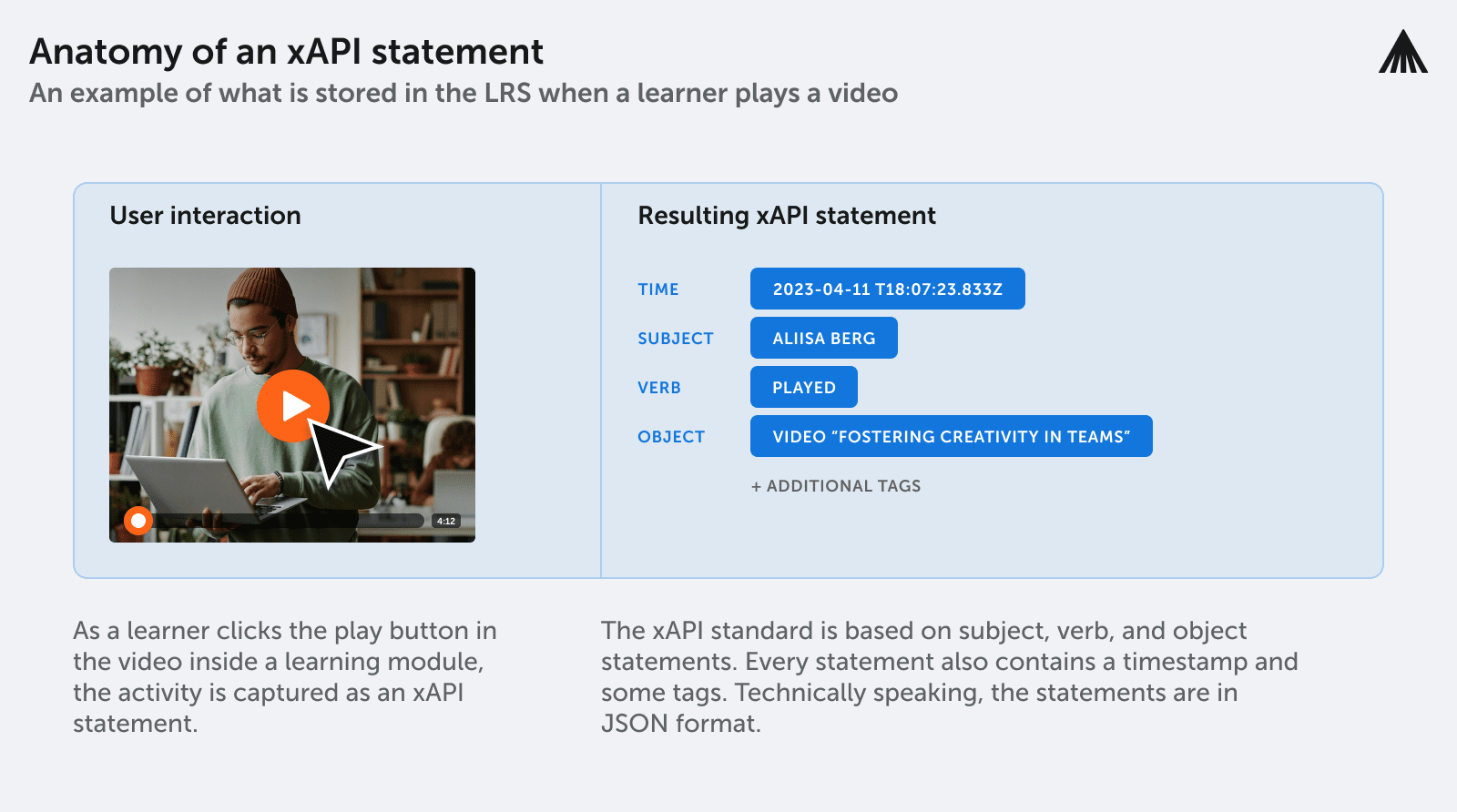
Each xAPI statement records learner activities, sending a secure notification to the LRS using the noun, verb, object, or “I did this” form. Identifying learners through a unique tag, often an email address, and recording what they did, the action they took, or the content they consumed.
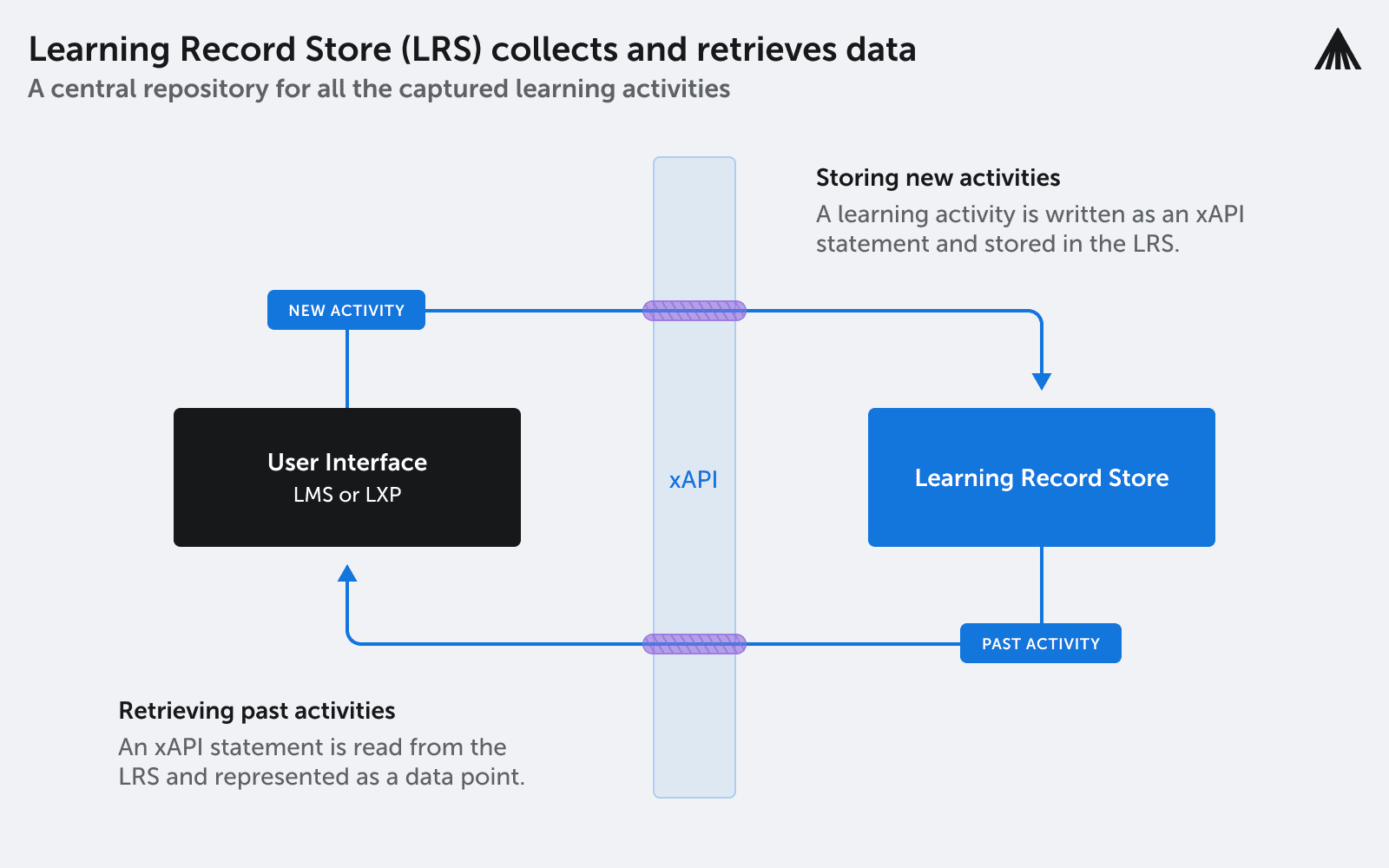
LRSs serve as a comprehensive archive of all learning activities happening within a company.
This allows learners to review their records, while L&D professionals can access xAPI statements associated with specific employees across different systems.
Various applications also use xAPI to assess, certify, or guarantee employees receive thorough compliance training.
LRS vs. Learning Management System (LMS)
While LRSs are typically standalone products with inbuilt reporting and analytics features, they can also be integrated into other learning platforms, most commonly learning management systems (LMSs).
| LRS | LMS | |
|---|---|---|
| What it is | A data store for learning records | A system for managing and delivering learning |
| Primary job | Receive, hold and share xAPI statements | Assign courses, track completion, report on it |
| Scope of data | Any learning activity, anywhere, including outside a course | Activity that happens inside the platform |
| Format | xAPI statements | Native reporting, often SCORM based |
| Can it talk to others | Yes, LRSs can pass records between each other | Usually through integrations rather than natively |
| Do you choose one | No. They do different jobs and most organizations need both | No |
It may sound like an LRS offers the same functionality as an LMS, but it is not a case of choosing one over the other. An LRS acts primarily as a data store, a repository containing all of the learning records produced at the company. In contrast, an LMS brings additional features concerning managing and delivering learning experiences.
LMSs track learning using their native reporting. It is possible to replace native LMS reporting with LRS and xAPI statements, making it easier to share learning data. LRSs can communicate with one another, allowing learning records to be ported from one system to another.
This makes it simple for information to be shared between organizations. For example, organizations can transfer employee learning records, helping new hires prove the training they received in their previous job.
What does an LRS enable?
The purpose of an LRS is to provide a single, comprehensive store for all the learning activities at an organization. With a single source of truth for learning records, organizations can understand the entire learning experience for each employee across various platforms. This could include:
- Real-world activities
- Learning platform content
- Mobile apps
- Videos
- Gamified training
With this data stored on the LRS, it is readily incorporated into other systems with advanced reporting, analytics, or visualization functionality.
Additionally, organizations can redesign their training programs based on up-to-date learning data.
Examples include real-time recommendation engines for personalized learning or training assessment programs to evaluate the effectiveness of a particular course or piece of material.
LRSs gather the data needed to implement more technically advanced learning solutions. With data-driven decision-making to guide L&D initiatives, organizations can improve learning outcomes and develop employees better suited for the modern workforce.
How does an LRS work?
You can break down LRS operations into five distinct processes:
1. Data collection.
As learning activities occur, xAPI statements are sent to the LRS.
This data comes from various systems, such as LMSs, learning experience platforms (LXPs), e-learning courseware, mobile apps, simulations, games, and other digital learning tools.
Data captured and collected by an LRS can include time spent on a learning activity, scores and assessment results, completion status, and learning interactions.
2. Data storage.
LRSs are designed to handle large amounts of data in a structured format. This allows for easy access and analysis.
3. Data analysis.
Data analysis tools process the collected data to generate reports, visualize trends, and identify patterns in learner behavior. Tools can also provide real-time feedback to learners and help personalize learning experiences.
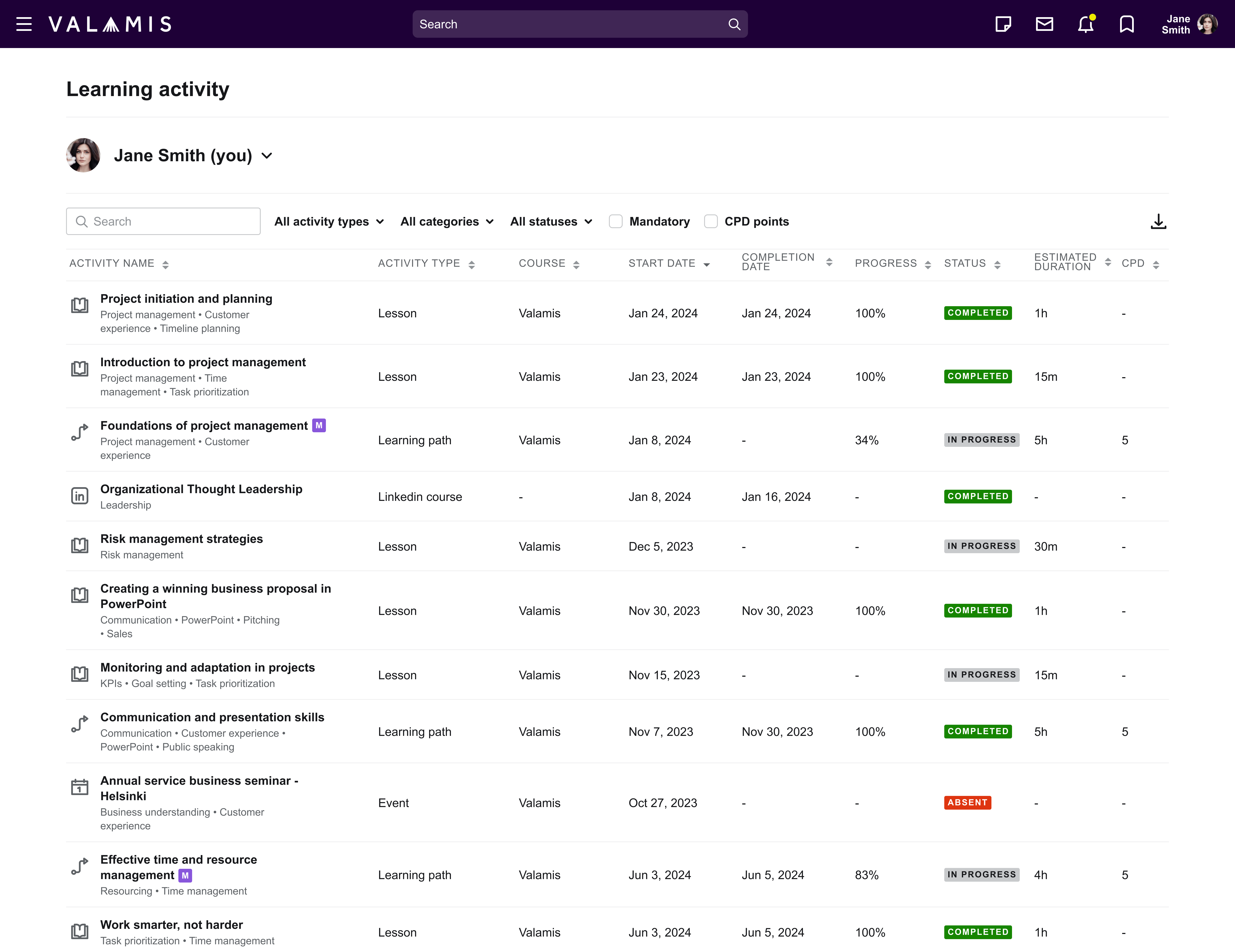
Example of the learning report at Valamis
4. Data sharing.
APIs (Application Programming Interfaces) allow LRS data to be shared among different systems.
This facilitates the integration of an LRS with other learning technologies and systems, such as an LMS or a learning content provider.
5. Data security.
Data collected by the LRS must be stored securely and in accordance with relevant regulations, for example, General Data Protection Regulations (GDPR) in the European Union.
LRSs also typically provide access controls to restrict learning data to only authorized personnel.
Learn how data security works at Valamis
Does your organization need an LRS?
Whether or not you need an LRS depends on how you want to track learner data and if you have several activities and systems capable of producing xAPI data.
LRS use cases:
Want to understand the impact of a particular piece of training material? Quickly pull up every employee that has interacted with it and track related performance metrics before and after.
Need to determine the skill gaps holding your organization back? Search learning records related to key skills or competencies to help identify holes in your workforce’s capabilities.
Looking to enhance the impact of training through personalized learning experiences? Use every employee’s learning records and performance data with recommendation engines to find the best training for them to complete next.
Collecting as much information as possible gives you more data to analyze in order to improve training activities.
This helps implement a range of L&D practices including:
- Personalized learning. An LRS tracks individual learning experiences, including the content an employee received and how they responded to it. This information can be analyzed to discover insights into an employee’s learning behavior and preferences to help tailor future content to their specific needs.
- Competency-based learning. LRS data can identify areas where employees require further development. L&D teams can track learner progress concerning different competencies, adjusting learning content to improve coverage or focus on specific areas the company wants to focus on.
- Analytics and reporting. Analyzing LRS data helps understand learner progress and performance. This can be especially helpful for larger organizations that need to monitor the learning outcomes for a significant number of employees across multiple departments.
- Compliance and regulation. Complying with data privacy regulations or other requirements is easier with a single repository to store learner information. LRSs help organizations track and manage learner data securely and competently.
- Blended learning. LRSs allow tracking and analyzing learner progression across different modalities. Especially useful for organizations using a combination of digital and traditional learning methods.

How to implement an LRS
Let’s walk through the four key steps to effectively implement an LRS in your organization
1. Designing your LRS solution
Before implementation, it is essential to consider what you need from your LRS and how you hope to develop your L&D processes around a new comprehensive learning data store.
- Are you just looking to start with improved reporting and dashboards to track employee learning?
- Do you want enhanced analytics and the ability to monitor the effectiveness of training efforts?
- Do you want to overhaul your approach to training and deliver personalized learning experiences?
Ultimately, the question you need to answer is this: what is your goal, and what do you hope to achieve with your learning data?
Implementing an LRS can be a lengthy process. Still, the answer to these questions guides every step that follows, from designing your solution and building leadership buy-in to aligning new practices with organizational goals and helping employees learn the new system.
2. Choosing the right LRS for your organization
Once you know what you want from your LRS, you can begin looking at the various solutions available, matching functionality to your needs.
While it is possible to build an LRS from scratch, it requires significant software development resources and an in-depth understanding of the xAPI specification. Identifying an off-the-shelf solution capable of meeting your goals is much easier.
3. Transitioning your learning technology infrastructure
Implementing the new LRS system and transitioning your learning technology infrastructure requires collaboration between the software provider and your IT department. It can be scary to throw away your existing processes and change to something unfamiliar overnight.
Performing a phased rollout or building up the system alongside existing processes is often better to minimise disruption.
Transitioning one team or system at a time to the new LRS infrastructure or introducing it in conjunction with existing L&D workflows to ensure it works before moving the whole company to the new LRS.
4. Reviewing and revising
The final step is to assess your new operations, comparing the real-life outcomes of your LRS software to the goals defined in step one. Implementing an LRS is itself a learning process, and it is common to discover new ideas or areas that need work during installation.
Don’t assume everything will be optimized from the start. After using the new system, it is essential to review and revise your approach. Listen to feedback from key stakeholders and play around with all of the new technology’s functionality before launching version 2.0.
Opt for a complete learning solution with built-in LRS
Instead of a lengthy and complex LRS implementation process, consider the benefits of choosing a complete learning solution with a built-in LRS, like Valamis.
By opting for an all-in-one platform, you can save time and money while enjoying the advantages of a comprehensive learning data store.
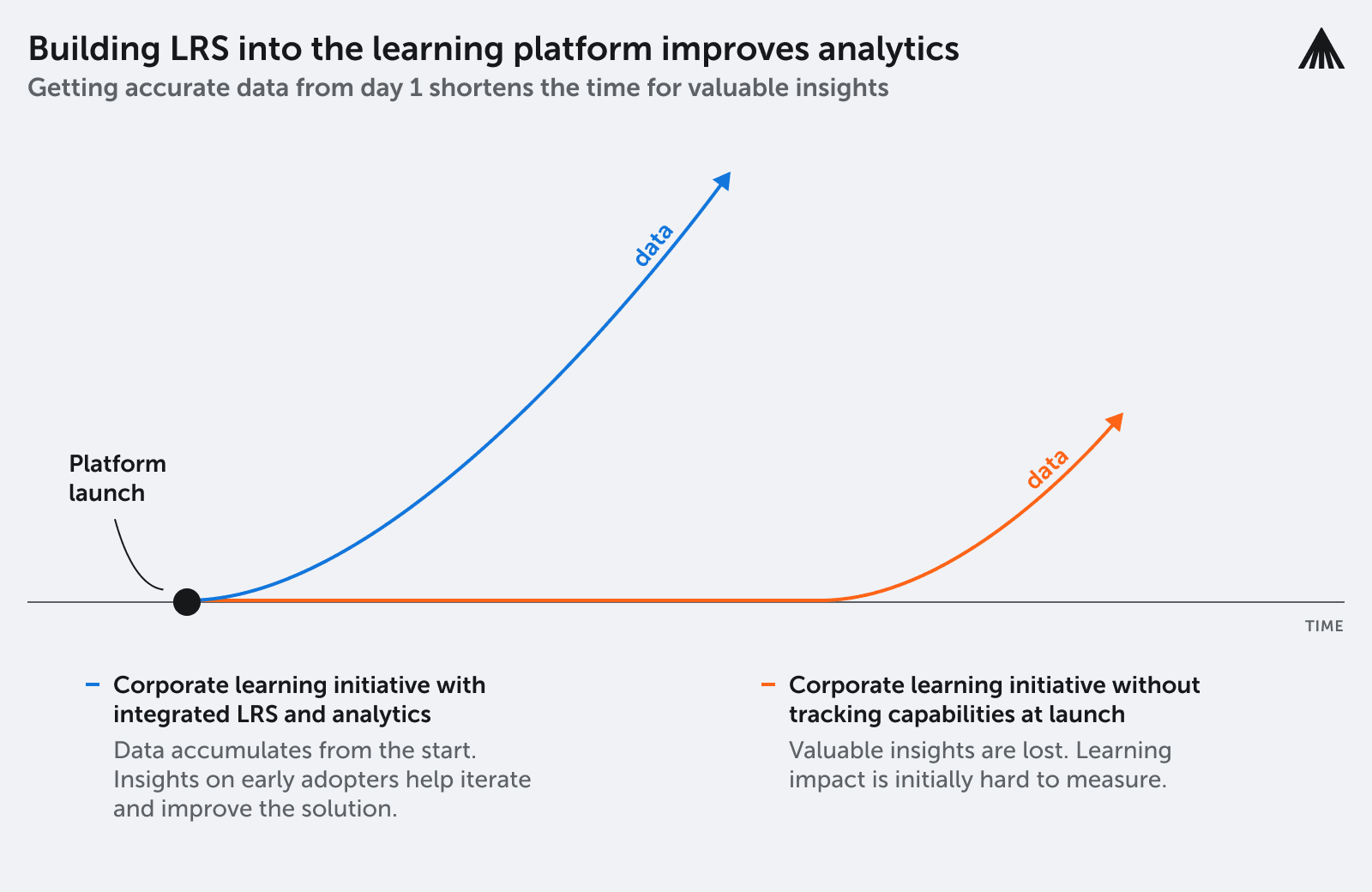
Benefits of a complete learning solution with built-in LRS:
Simplified implementation: Avoid the hassle of designing and transitioning your learning technology infrastructure. An integrated LRS streamlines the process and reduces the time spent on implementation.
- Cost-effective. Purchasing a single, end-to-end learning solution is more budget-friendly than investing in separate tools, as you only need one subscription instead of multiple.
- Fits the rest of the platform. A built-in LRS is compatible with the learning platform’s other features, providing a unified experience without the need for additional integration work.
- Cohesive user experience. With a complete learning solution, employees and administrators will have a consistent experience across all learning activities, making it easier to navigate and manage.
- Streamlined support. When you choose a platform with an integrated LRS, you’ll only need to deal with one vendor for support and maintenance, simplifying communication and issue resolution.
Side by side:
| Standalone LRS | LRS built into the platform | |
|---|---|---|
| Implementation | A separate system to specify, procure and connect | Already there, nothing to integrate |
| Cost | A second subscription alongside the learning platform | One subscription |
| Data consistency | Statements arrive from several systems in several shapes | One schema, because one system is writing them |
| Support | Two vendors, and a gap between them when something breaks | One vendor |
| Reporting | Learning data in one place, compliance and skills in another | Learning, compliance and skills in the same record |
| Best for | Organizations with many learning sources and no single platform | Organizations that want one record of what people have done |
Conclusion
LRSs offer a single organized data store to track all your organization’s learning activities. Rather than various systems tracking bits and pieces of information, you get a single source of truth for all your learning data.
Plus, with the xAPI specification, LRSs can communicate with other LRSs to quickly transfer learning records. Employees can maintain proof of training across organizations, and businesses can transfer data to other platforms for advanced analysis and improved insights.
Schedule a personalized consultation with our Learning experts to get tailored advice and recommendations for your organization.
Where this sits in Valamis
Valamis includes a learning record store as part of the platform rather than as a separate product. Statements from courses, events, mobile use, external content and integrated systems are all written to the same store, in consistent xAPI, alongside compliance records and skills data. That store now holds more than 500 million learning interactions.
The consistency matters more than the volume. xAPI is deliberately flexible, which means two systems can describe the same activity in different ways. A store full of statements in different shapes is technically a learning record and practically very hard to analyze. When one platform is writing the statements, the schema holds.
It also changes what you can ask of it. Valamis has an MCP server built into the platform, with published connectors for Microsoft Copilot and Claude, so an AI assistant can query that record directly. An assistant reading a complete and consistent learning history answers a different class of question than one reading a course catalog.
Frequently asked questions about learning record stores
What is a learning record store?
A learning record store, or LRS, is a database that receives, holds and shares learning records in xAPI format. It is where learning activity goes once it has been captured, including activity that happens outside a formal course.
What is the difference between an LRS and an LMS?
An LRS is a data store. An LMS manages and delivers learning. An LRS holds records of what happened, from any source. An LMS assigns courses, tracks completion and reports on it. They do different jobs and most organizations end up needing both.
Do you need a separate LRS if your LMS has one built in?
Usually not. A built-in LRS removes a second subscription, a second vendor and an integration project, and it means statements are written in one consistent schema. A standalone LRS makes more sense when learning data comes from many systems and no single platform is the hub.
What are the benefits and drawbacks of a built-in LRS versus a standalone one?
Built in means simpler implementation, one cost, one vendor and consistent data, with learning, compliance and skills in the same record. Standalone means independence from any one platform, which matters if you expect to change learning systems or if you are collecting from many unrelated sources.
Does an LRS replace SCORM?
Not exactly. SCORM tracks activity inside a course on an LMS. xAPI and an LRS track activity anywhere, including simulations, mobile, offline and on-the-job performance. Most organizations run both for a period, with SCORM covering legacy content.
Can an AI assistant read a learning record store?
It depends on the platform. Some now expose the record through an MCP server or an equivalent, which lets an assistant answer questions from actual learning activity rather than from a course catalog. Worth asking whether there is a charge per call and whether you can use your own model.
One record, not two systems
A learning record store built into the platform, consistent xAPI, and more than 500 million interactions behind it.