What is SCORM? SCORM compliance, versions and xAPI explained
The guide about SCORM learning standard. Learn what can be tracked by SCORM and what the benefits are. Comparison SCORM vs. xAPI (Tin Can API).


Valamis
Discover:
- What is SCORM?
- How SCORM works
- What does SCORM compliant mean?
- What can SCORM track?
- SCORM 1.2 vs SCORM 2004
- Pros and cons of SCORM
- SCORM vs xAPI vs cmi5
- Which standard should you use?
- Frequently asked questions
SCORM is a set of technical standards that lets eLearning content and learning management systems work together. A course built to SCORM can be uploaded to any SCORM compliant LMS, which then launches it and records whether the learner completed it, passed it, what they scored and how long they spent.
SCORM has been the most widely used eLearning standard for more than twenty years. Newer standards, xAPI and cmi5, track much more, but most organizations still rely on SCORM for at least part of their content.
What is SCORM?
SCORM stands for Sharable Content Object Reference Model. It was developed by the Advanced Distributed Learning (ADL) initiative, part of the US Department of Defense, so that training content could be built once and used in any learning system.
A sharable content object (SCO) is the smallest piece of a course that can report back to an LMS, such as a lesson or a quiz. SCORM defines how those objects are packaged, how the LMS launches them and how they exchange data while a learner works through them.
The two versions still in use are SCORM 1.2, released in 2001, and SCORM 2004, which reached its fourth and final edition in 2009.
How SCORM works
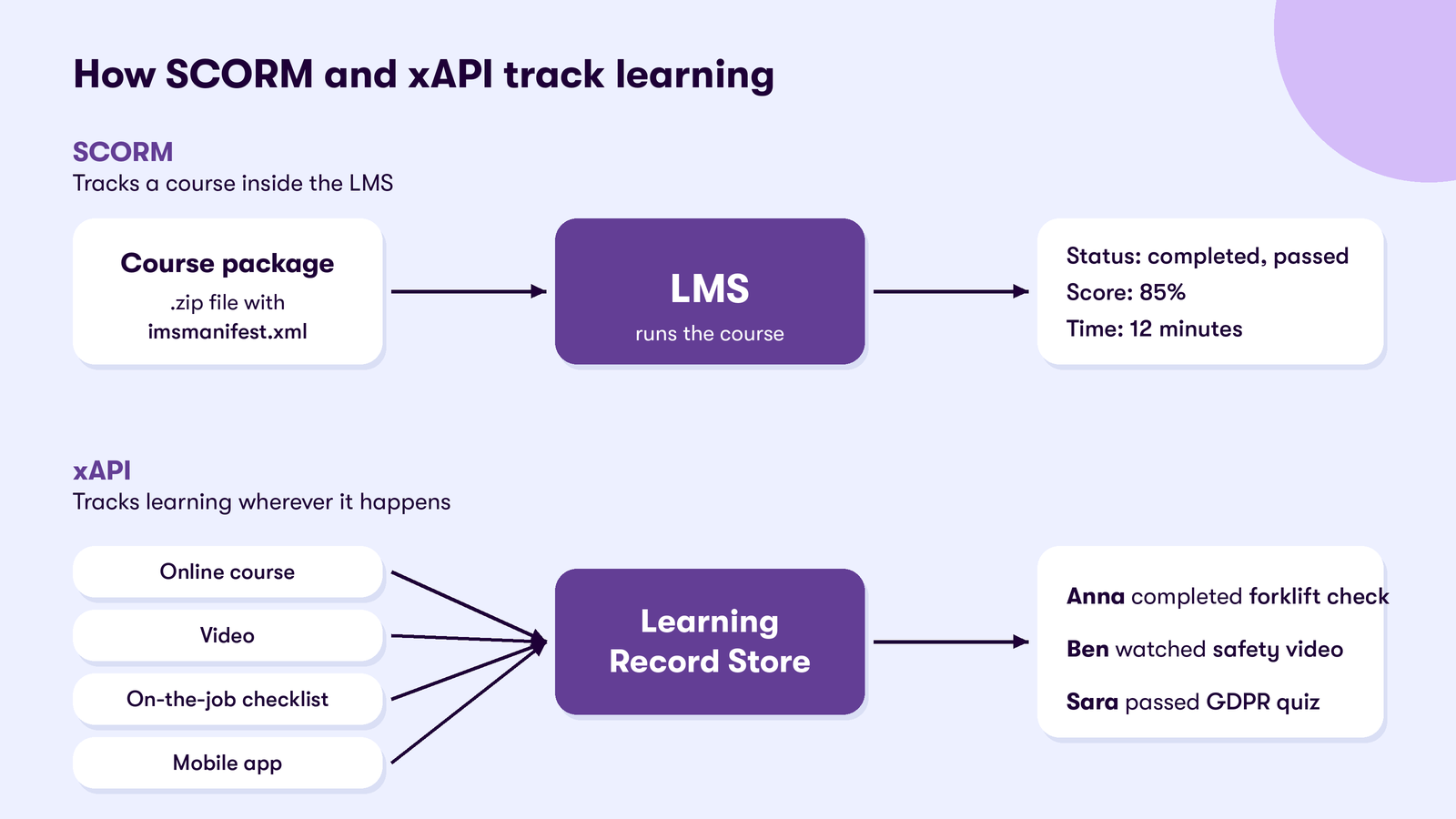
SCORM works in three parts:
- Packaging. The course is delivered as a .zip file containing the content and a manifest file, imsmanifest.xml, that tells the LMS what is inside and how to launch it.
- Run-time communication. When a learner opens the course, it talks to the LMS through a JavaScript interface in the browser, sending data such as progress, answers and score.
- Sequencing. In SCORM 2004, the package can also set rules for the order in which learners move through the content.
Because everything happens inside the LMS and the browser, SCORM can only track learning that takes place in a course launched from the LMS.
What does SCORM compliant mean?
SCORM compliant means that content or a learning platform follows the SCORM specification, so the two can work together.
- SCORM compliant content is packaged and built so any SCORM compliant LMS can import it, launch it and receive its tracking data. Most authoring tools can export SCORM packages.
- A SCORM compliant LMS can import SCORM packages, launch them and store the data they send. Check which versions an LMS supports, as some support SCORM 1.2 but not SCORM 2004.
In practice, compliance is not always perfect. Before rolling out important courses, such as compliance training, test each package in your own LMS to make sure completion and scores are recorded correctly.
What can SCORM track?
SCORM records a defined set of data about each learner’s attempt at a course:
- Completion status: whether the learner finished the course
- Success status: whether they passed or failed
- Score on assessments
- Time spent in the course
- Bookmarking, so learners can return to where they stopped
- Answers to individual questions, in more detail in SCORM 2004
SCORM cannot track learning outside the course, such as a video watched elsewhere, a mentoring session or a skill demonstrated on the job.
SCORM 1.2 vs SCORM 2004
| SCORM 1.2 | SCORM 2004 | |
|---|---|---|
| Released | 2001 | 2004, final edition in 2009 |
| Completion and pass/fail | Combined in one status | Reported separately |
| Space to save progress | 4,096 characters | 64,000 characters |
| Sequencing rules | No | Yes |
| Support | Almost universal | Widely supported, but less than 1.2 |
SCORM 1.2 is the safest choice when content has to run in many different systems. SCORM 2004 is the better choice when you need to report completion and passing separately, save more progress data or control the order of content.

Checklist on how to choose the best LMS
The checklist will keep your focus on what really matters when choosing an LMS.
DownloadPros and cons of SCORM
Pros
- Supported by almost every LMS and authoring tool
- Content can move between systems without rebuilding it
- Simple, reliable tracking of completion, pass or fail and score
- A large existing library of SCORM courses from content providers
Cons
- Only tracks learning inside a course launched from the LMS
- Limited data: no detail about real-world performance or informal learning
- Needs a browser session, so it does not work well offline or in mobile apps
- The standard is no longer developed; new work happens in xAPI and cmi5
SCORM vs xAPI vs cmi5
xAPI (Experience API, also known as Tin Can) was released by ADL in 2013 to track learning anywhere, not just inside an LMS. cmi5, released in 2016, combines the two: it brings xAPI tracking to courses launched from an LMS, with rules that make content behave consistently, as SCORM does.
| SCORM | xAPI | cmi5 | |
|---|---|---|---|
| Released | 2001 (1.2), 2004 | 2013 | 2016 |
| What it tracks | Courses launched from the LMS | Any learning activity, online or offline | LMS-launched courses, with xAPI data |
| Where data is stored | In the LMS | In a Learning Record Store (LRS) | In an LRS |
| Mobile and offline | Limited | Yes | Yes |
| Level of detail | Completion, pass or fail, score, time | Detailed statements, such as “Anna completed the forklift check” | Detailed statements with consistent course rules |
Which standard should you use?
- Use SCORM for off-the-shelf courses and existing content libraries, and whenever content has to run in many different systems.
- Use xAPI when you want to track learning beyond courses: on-the-job training, simulations, videos, events and mobile learning, and connect it to performance data.
- Consider cmi5 for new LMS-based courses where you want the richer data of xAPI with the predictable behavior of SCORM. Check that your LMS and authoring tool support it.
Most organizations use a mix: SCORM for their existing library, and xAPI for everything SCORM cannot see.
SCORM and xAPI in Valamis
Valamis is built on xAPI and has its own Learning Record Store, so it can record learning from courses, events, on-the-job training and other systems in one learning history. Content created in Valamis Studio, the built-in authoring tool, supports both SCORM and xAPI.
Frequently asked questions
What does SCORM stand for?
SCORM stands for Sharable Content Object Reference Model. It is a set of standards for packaging eLearning content and tracking it in a learning management system.
What is a SCORM file?
A SCORM file is a .zip package containing a course’s content and a manifest file, imsmanifest.xml, that tells the LMS how to import and launch it. You upload the .zip file to a SCORM compliant LMS rather than unzipping it.
Is SCORM outdated?
SCORM is no longer being developed, but it is still the most widely supported eLearning standard. It works well for tracking courses, while xAPI and cmi5 are better for tracking learning outside them.
Is xAPI replacing SCORM?
Not completely. xAPI tracks much more than SCORM and is used for new types of learning, but most LMSs and content libraries still use SCORM. Many organizations use both.
What is cmi5?
cmi5 is a standard released in 2016 that defines how an LMS launches and tracks courses using xAPI. It is often described as a modern replacement for SCORM, because it keeps SCORM’s predictable course behavior while adding xAPI’s richer data.
Track every kind of learning in one place
Run SCORM courses and capture xAPI learning from events, on-the-job training and other systems in one learning history.