How to build employee onboarding checklist that drives results
Discover a comprehensive employee onboarding checklist to ensure you’re fully prepared to welcome and support your newest team members.
Download our templates in Excel and PDF formats.


Employee onboarding is a big task, and with so many moving parts, it’s easy for important steps to slip through the cracks. From paperwork and IT setup to training and culture-building, each stage shapes how a new hire experiences your organization.
Despite its importance, many organizations are still missing the mark. Research by Gallup found that only 12% of employees strongly agree their organization does a great job onboarding new employees. A poor onboarding experience can leave new hires feeling unsupported, disengaged, and at risk of leaving before they have had the chance to succeed.
To help you avoid these pitfalls, we have created a practical onboarding checklist you can use to stay organized. A well-structured checklist ensures consistency, compliance, and a positive first impression that sets employees up for long-term success.
Discover:
- What is an employee onboarding checklist?
- Why is an onboarding checklist essential?
- Employee onboarding checklist: Create a smooth new hire experience with this 5-phase process
- Onboarding checklist templates (Excel)
- Trello onboarding templates
- FAQ about onboarding checklist
What is an employee onboarding checklist?
An onboarding checklist is a structured tool that organizes all the steps managers, HR, and team leads need to complete when preparing for a new employee. It covers everything from administrative tasks like paperwork and IT setup to first-day introductions, training sessions, and culture integration.
The purpose of the checklist is twofold: it ensures the organization is fully prepared before the employee’s arrival, and it guides the new hire through their first days and weeks, creating a smoother and more supportive experience. By following a clear checklist, companies can reduce errors, maintain consistency across departments, and make sure every new hire receives the same high-quality onboarding journey.

Onboarding checklist in PDF and Excel formats
Ensure a smooth and effective onboarding process for your new hires and set them up for success.
DownloadWhy is an onboarding checklist essential?
A new employee’s first days set the tone for their entire experience with an organization. Without a clear process, it’s easy for critical steps to be missed. An employee onboarding checklist gives HR professionals and managers a structured framework to ensure nothing falls through the cracks.
By standardizing the process, a checklist not only improves efficiency but also creates a consistent and supportive experience for every new hire. This makes onboarding less overwhelming for HR teams and more engaging for employees, while aligning the entire organization around a shared approach.
Here are some of the key benefits of using an onboarding checklist:
- Streamlined process: Provides a step-by-step framework that saves time, reduces errors, and ensures every new hire receives the same high-quality experience.
- Improved compliance: Helps organizations stay on top of legal, contractual, and policy requirements, while creating a documented trail for audits.
- Enhanced employee experience: Smooths the transition into the company, boosting confidence, engagement, and satisfaction from day one.
- Better communication: Clarifies expectations for new hires, managers, and HR, while coordinating tasks across multiple departments.
- Faster productivity: Reduces ramp-up time by ensuring new employees have the tools, knowledge, and support they need to contribute quickly.
- Supports retention: Engages employees early, fostering loyalty and helping identify career development opportunities that encourage long-term growth.
- Customization and flexibility: Can be adapted for different roles, seniority levels, or departments, and scaled to meet varying onboarding volumes.
- Data-driven improvements: When tracked over time, onboarding checklists generate valuable insights that HR teams can use to refine and optimize the process.
Employee onboarding checklist: Create a smooth new hire experience with this 5-phase process
From the welcome email to pre-boarding, the first day, first week, and first month, our employee onboarding checklist templates will help HR teams, managers, and employees stay aligned.
Each checklist is available as a printable PDF or Excel download, making it simple to adapt for in-office, hybrid, or remote employees.
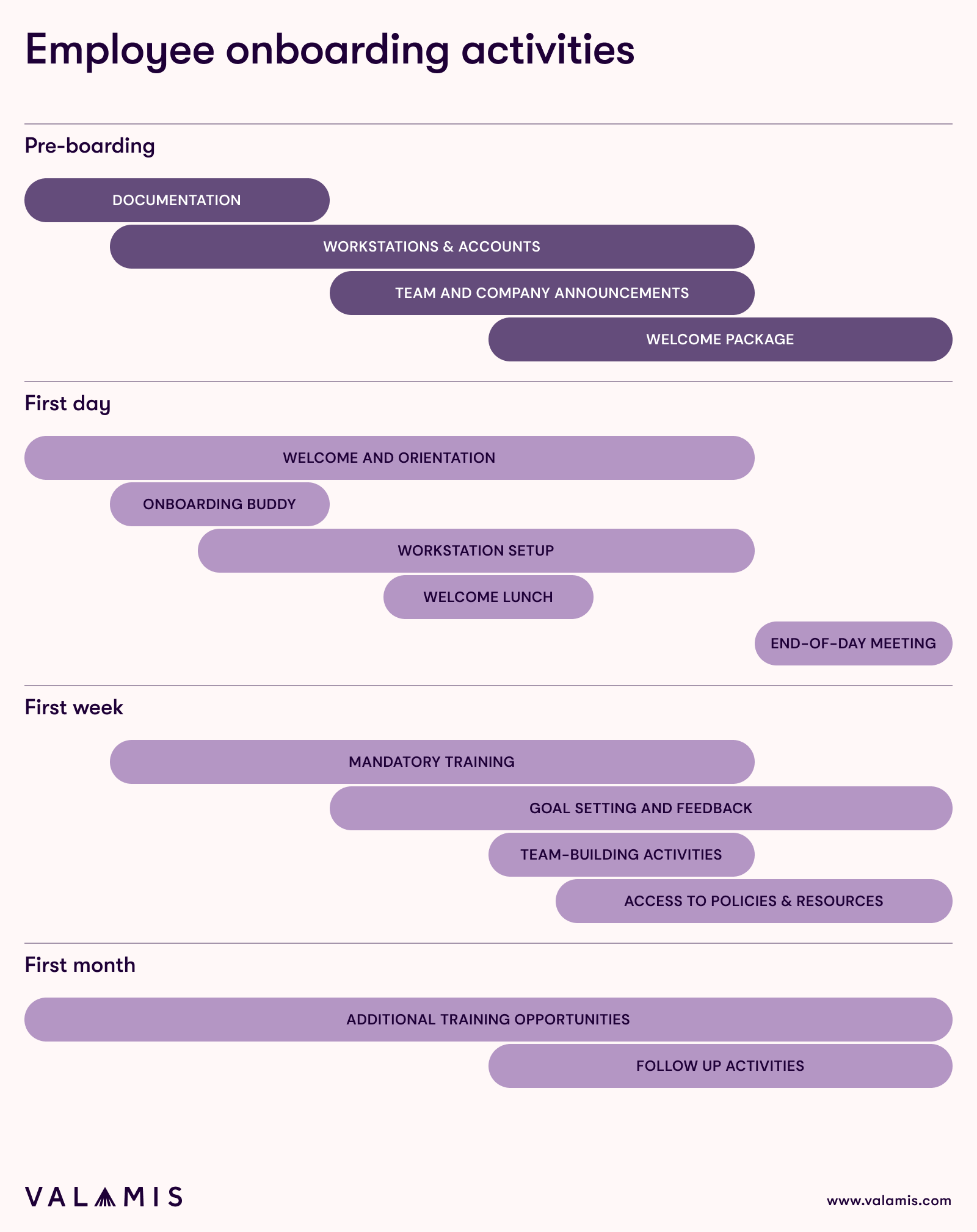
The welcome email checklist
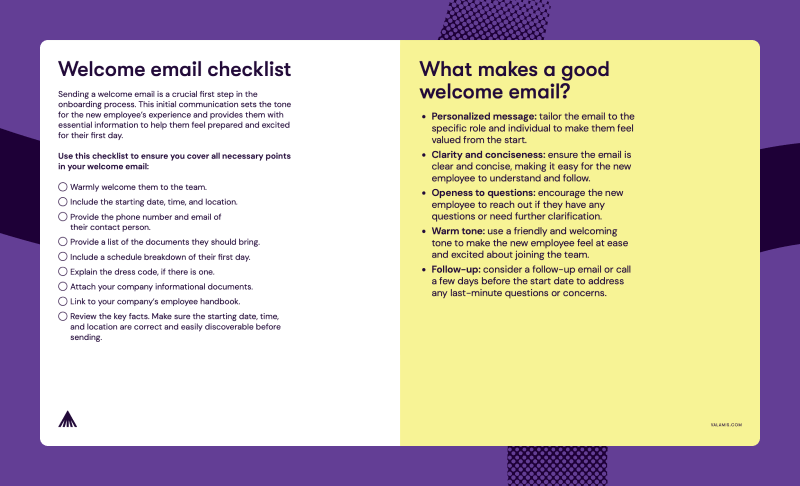
Download a printable template PDF
The welcome email is the first official communication your new employee receives from your organization, aside from contract or offer letters. It sets the tone for their experience, creates a positive first impression, and helps them feel prepared and confident for day one.
A clear, informative, and warm welcome email can make all the difference in starting the onboarding process on the right foot.
Your welcome email should include:
- A warm greeting: Make your new hire feel valued and excited to join the team.
- Start date, time, and location: Include any details about where they should report, or instructions for virtual onboarding if applicable.
- Point of contact: Provide the phone number and email of their contact person or team lead for any questions before their start date.
- Required documents: List anything they need to bring or prepare, such as ID.
- First-day schedule: Outline key meetings, training sessions, or orientation activities to help them plan their day.
- Dress code information: Include guidelines if there’s a specific dress policy.
- Company informational materials: Attach brochures, guides, or other resources that introduce the organization.
- Employee handbook link: Give them access to your company handbook so they can familiarize themselves with policies and procedures in advance.
Pre-Onboarding checklist
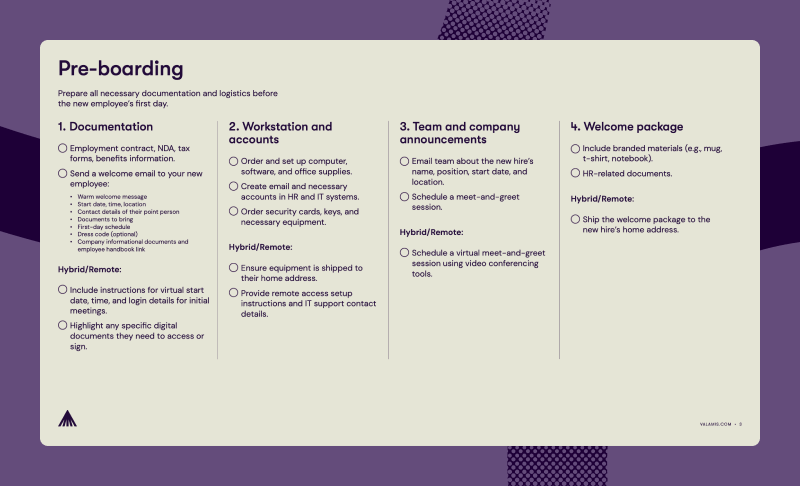
Download an employee onboarding checklist (in PDF and Excel formats).
The pre-onboarding phase is critical to ensure that new hires feel prepared, welcomed, and supported from the moment they join your organization. This stage helps HR teams and managers get everything ready in advance, so the first day runs smoothly and no important steps are missed.
Key tasks for pre-onboarding include:
1. Prepare documentation
- Ensure all necessary paperwork is ready, including employment contracts, NDAs, tax forms, and benefits information.
- Send a warm welcome email (See the section above)
Hybrid/Remote considerations:
- Include instructions for virtual start times and login details for initial meetings.
- Highlight any digital documents that must be accessed or signed before day one.
2. Set up workstation and accounts
- Order and set up computer, software, and office supplies
- Create email and necessary accounts in HR and IT systems
- Order security cards, keys, and any additional equipment
Hybrid/Remote considerations:
- Ship equipment to their home address
- Provide remote access instructions and IT support contact details
3. Team and company announcements
- Notify the team about the new hire: name, position, start date, and location
- Schedule a meet-and-greet session
Hybrid/Remote considerations:
- Arrange a virtual meet-and-greet
4. Welcome package
- Include branded materials (e.g., mug, notebook, t-shirt)
- Include HR-related documents
Hybrid/Remote considerations:
-
- Ship the welcome package to the employee’s home address
First day checklist
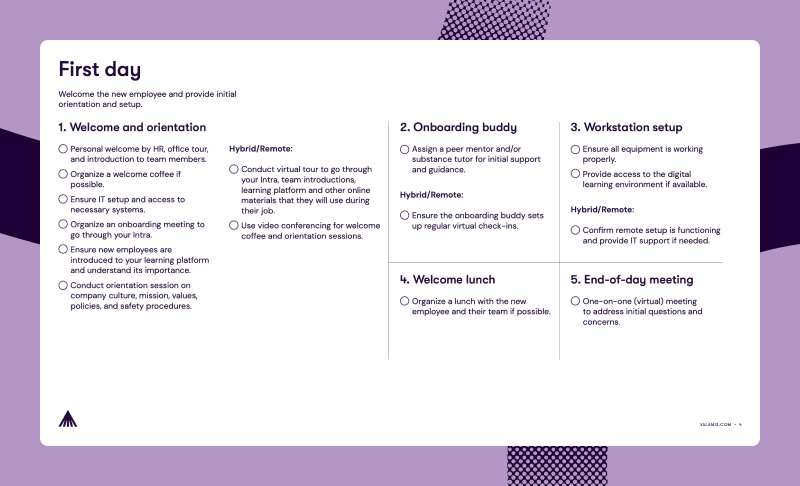
Download an employee onboarding checklist (in PDF and Excel formats).
The first day sets the tone for a new hire’s entire experience. It’s the opportunity to make them feel welcomed, supported, and confident in their new role.
A well-planned first day ensures that employees understand their responsibilities, get to know their team, and begin to integrate into the company culture from the very start.
Tasks:
1. Welcome and orientation
- Personal welcome by HR, office tour, and introduction to team members
- Organize a welcome coffee if possible
- Ensure IT setup and access to necessary systems
- Organize an onboarding meeting to go through your INTRA
- Ensure new employees are introduced to your LMS and understand its importance
- Conduct orientation session on company culture, mission, values, policies, and safety procedures
Note for Hybrid/Remote employees:
- Conduct virtual tour to go through your INTRA, team introductions, learning platform and other online materials
- Use video conferencing for welcome coffee and orientation sessions
2. Onboarding buddy
- Assign a peer mentor and/or substance tutor for initial support and guidance
Note for Hybrid/Remote employees:
- Ensure the onboarding buddy sets up regular virtual check-ins.
3. Workstation setup
- Ensure all equipment is working properly
- Provide access to the digital learning environment if available
Side note for Hybrid/Remote employees:
- Confirm remote setup is functioning and provide virtual IT support if needed.
4. Welcome lunch (optional)
- Organize a lunch with the new employee and their team
5. End-of-day meeting
- One-on-one (virtual) meeting to address initial questions and concerns
First week checklist
Download an employee onboarding checklist (in PDF and Excel formats).
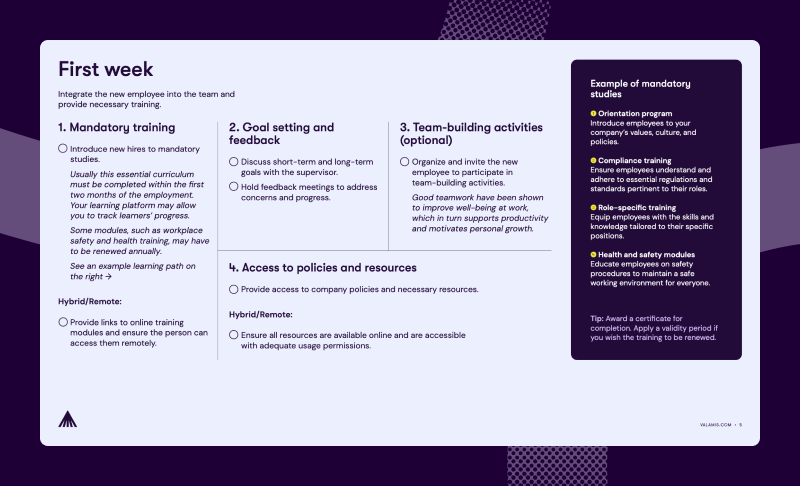
A well-structured first week ensures that employees feel supported, understand their responsibilities, and begin building strong connections with their team and organization.
The goal during the first week is to provide guidance, introduce key resources, and foster a sense of belonging without overwhelming your new employee.
Tasks:
1. Mandatory training sign-ins
Introduce new hires to the mandatory studies learning path (typically completed within the first two months and renewed annually).
Example of mandatory studies learning path. This path includes:
- Orientation program: Introduce employees to your company’s values, culture, and policies.
- Compliance training: Ensure employees understand and adhere to essential regulations and standards pertinent to their roles.
- Role-specific training: Equip employees with the skills and knowledge tailored to their specific positions.
- Health and Safety Modules: Educate employees on safety procedures to maintain a safe working environment for everyone.
Note for Hybrid/Remote employees:
- Provide links to online training modules and ensure remote access.
2. Goal setting and feedback
- Discuss short-term and long-term goals with the supervisor
- Hold feedback meetings to address concerns and progress
3. Team-building activities (optional)
- Organize and invite the new employee to participate in team-building activities
- Access to policies and resources
- Provide access to company policies and necessary resources
Note for Hybrid/Remote employees:
- Ensure all resources are accessible online.
First month checklist
Download an employee onboarding checklist (in PDF and Excel formats).
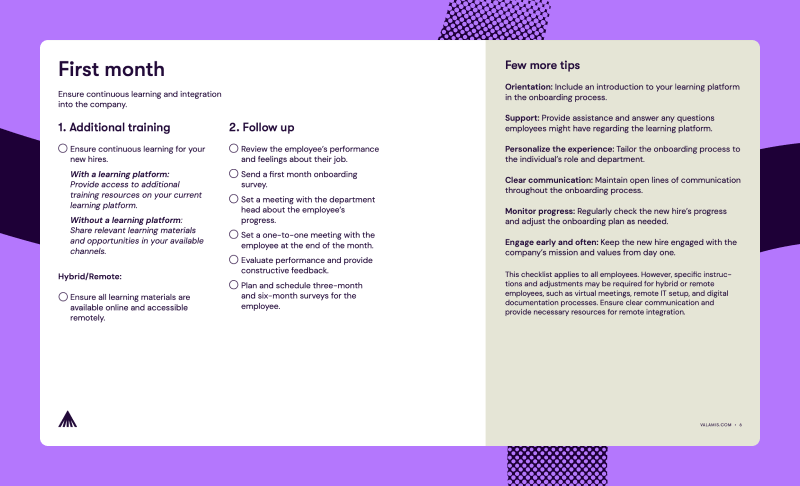
The first month is an important period for reviewing performance, addressing concerns, and helping new hires fully integrate into their role and the organization.
Use this time to provide guidance, offer support, and identify any challenges early to ensure long-term success.
Tasks:
1. Ensure continuous learning for your new hires
- With LMS: provide access to additional training resources on your current LMS
- Without LMS: share relevant learning materials and opportunities
Note for Hybrid/Remote employees:
- Ensure all learning materials are available online.
Tip: To maintain compliance and stay updated with the latest practices, remind employees to complete the Mandatory Studies Learning Path annually. This ensures continuous development and adherence to current standards.
2. Performance and feedback review
- Review the employee’s performance and feelings about their job
- Send a first month onboarding survey
- Set a meeting with the department head about the employee’s progress
- Set a one-to-one meeting with the employee at the end of the month
- Evaluate performance and provide constructive feedback
- Plan and schedule three-month and six-month surveys for the employee
Additional Onboarding Tips
- Orientation: Introduce new hires to your LMS early in the onboarding process to familiarize them with available learning resources.
- Monitoring: Regularly track employees’ progress and completion of their learning paths to ensure they stay on track.
- Support: Be available to answer questions and provide guidance on using the LMS or accessing resources.
- Personalize the experience: TTailor onboarding activities and learning paths to each employee’s role and department.
- Clear communication: Maintain open lines of communication throughout the onboarding process to address concerns and provide guidance.
- Monitor progress: Regularly review the new hire’s progress and adjust the onboarding plan as needed for optimal results.
- Engage early and often: Keep employees engaged with the company’s mission, values, and culture from day one to foster motivation and belonging.
Remote Onboarding Checklist
This checklist applies to all employees, but hybrid and remote hires may require additional adjustments. Consider virtual meetings, remote IT setup, and digital documentation processes. Ensure clear communication and provide all necessary resources to support seamless integration into the organization.
Excel onboarding checklist templates
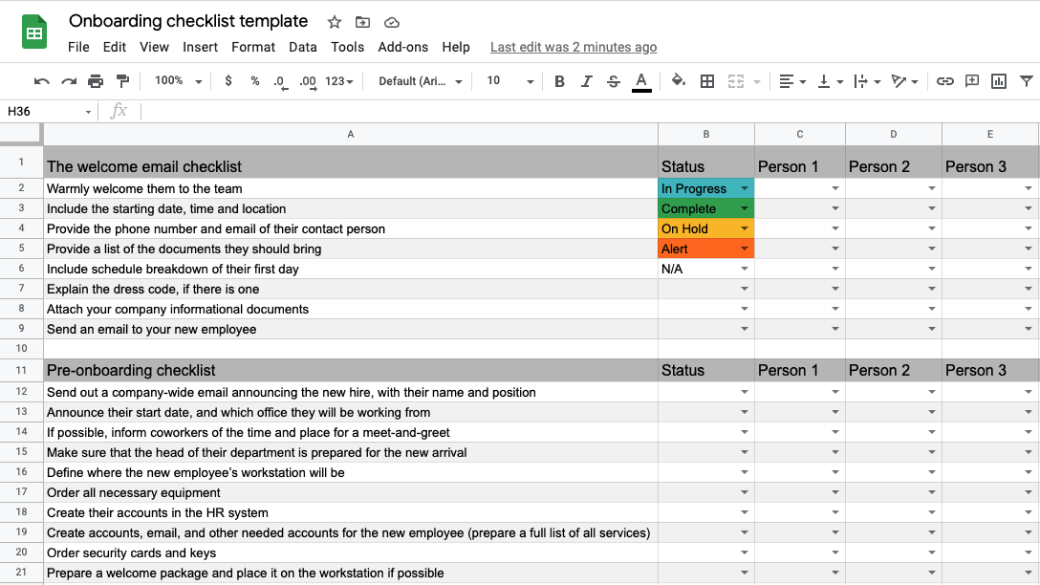
1. Template for several employees – dropdown selector
Download template Google Sheets / Excel (.xlsx).
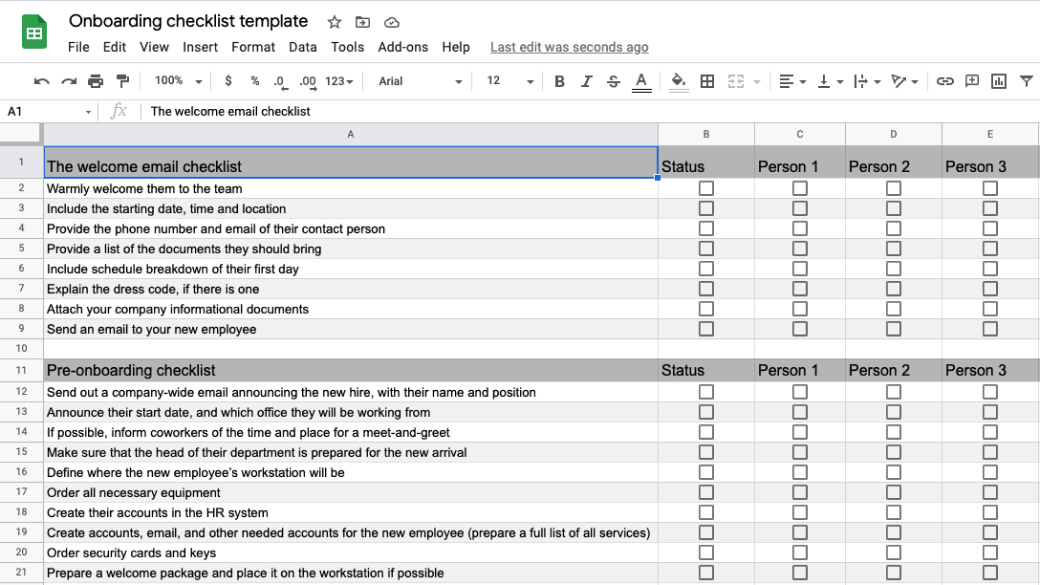
2. Template for several employees – checkboxes
Download template Google Sheets / Excel (.xlsx).
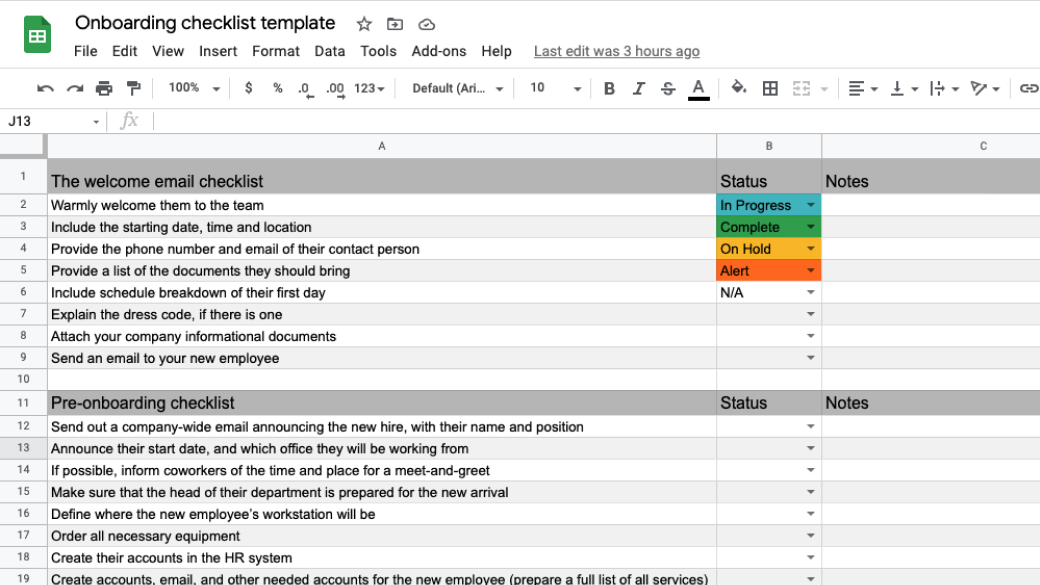
3. Template for a single employee – dropdown selector
Download template Google Sheets / Excel (.xlsx).
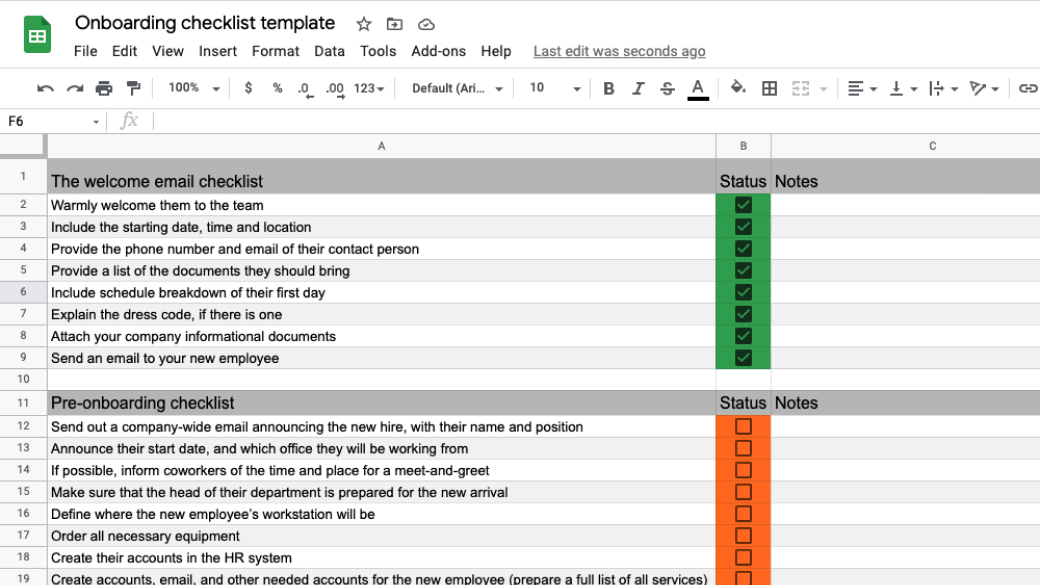
4. Template for a single employee – checkboxes
Download template Google Sheets / Excel (.xlsx).
Trello onboarding templates
- New Employee Onboarding template by Valamis – check template
- Onboarding Process For New Hires by InVision – check template
- Government Onboarding Process For New Hires – check template
FAQ about onboarding checklist
What is an onboarding checklist?
An onboarding checklist is a structured guide that outlines the steps necessary to prepare for a new employee’s start. It helps managers and HR teams ensure that all preparations are complete and provides a roadmap for guiding new hires through their first days, weeks, and months.
How long should an onboarding checklist be?
The length of an onboarding checklist can vary depending on the role, department, and company processes. It should be comprehensive enough to cover all essential phases, from pre-boarding and orientation to initial training, team integration, and early performance check-ins.
How to create an onboarding checklist?
Creating an onboarding checklist begins with identifying the key stages of your onboarding process, from recruitment to full integration into the team. It is important to list critical tasks for each stage.
Additional details such as equipment setup, access to digital accounts, and use of systems like an LMS should also be included.
Organizing tasks in chronological order ensures a clear, step-by-step process, and the checklist should be tailored to different roles, departments, and work arrangements, including in-office, hybrid, or remote positions.
What to include on an onboarding checklist?
An effective onboarding checklist typically addresses pre-onboarding tasks such as documentation, workspace setup, and welcome communications. It covers first-day activities including welcome meetings, orientation, IT setup, and introduction to learning platforms.
The checklist should also address first-week and first-month objectives, such as training completion, goal setting, team-building activities, performance reviews, and ongoing feedback.
Why is a checklist for onboarding important?
An onboarding checklist ensures a consistent, structured onboarding process, which reduces errors and improves efficiency. It enhances the employee experience, accelerates productivity, and supports retention by giving new hires the clarity and confidence they need to succeed.
Can an onboarding checklist be used for remote employees?
Yes. While the same checklist applies, remote or hybrid employees may require adjustments such as virtual meetings, remote IT setup, access to online training, and digital documentation.