Best ways to track employee training
Compare the three main ways to track employee training, the metrics worth monitoring, and how to choose the right approach for your L&D team.


Article summary: There are three common ways to track employee training: a learning management system, a spreadsheet, or a training management system. The right choice depends on how many people you train, whether any of that training is mandatory, and how much manual administration your team can absorb. This guide covers the metrics worth tracking and how to decide between the three options.
Keeping track of employee training sounds simple, but the right approach can vary considerably depending on what your organization needs to monitor.
For some L&D teams, the priority is maintaining accurate records of mandatory training, completions, and certification renewals. Others may also need to track assessment results, progress through learning pathways, or the development of specific skills.
The most effective approach is one that gives L&D teams reliable, up-to-date information without creating unnecessary admin.
This article will cover:
- Why employee training should be tracked
- Which training metrics are worth monitoring
- The main ways to track employee training
- How to choose the right approach
- How Valamis helps organizations track employee training
Why should you track employee training?
Tracking employee training helps L&D teams maintain a reliable record of learning across the organization.
This is particularly important when employees need to complete specific training for regulatory, safety, security, or organizational requirements. L&D teams need to know who has completed the required learning, who is overdue, and when certifications or qualifications need to be renewed.
Training records can also provide a broader view of how employees engage with learning and development.
Participation rates can highlight which programs attract employees and which receive less attention. Assessment results can show how learners perform. Learning pathway data can help L&D teams see whether employees are making progress through longer development programs.
Having this information in one place also makes it easier to answer questions from senior leaders and help prove L&D ROI.
Which employee training metrics should you track?
The most relevant measures depend on the type of training, the audience, and the outcome your organization wants to achieve.
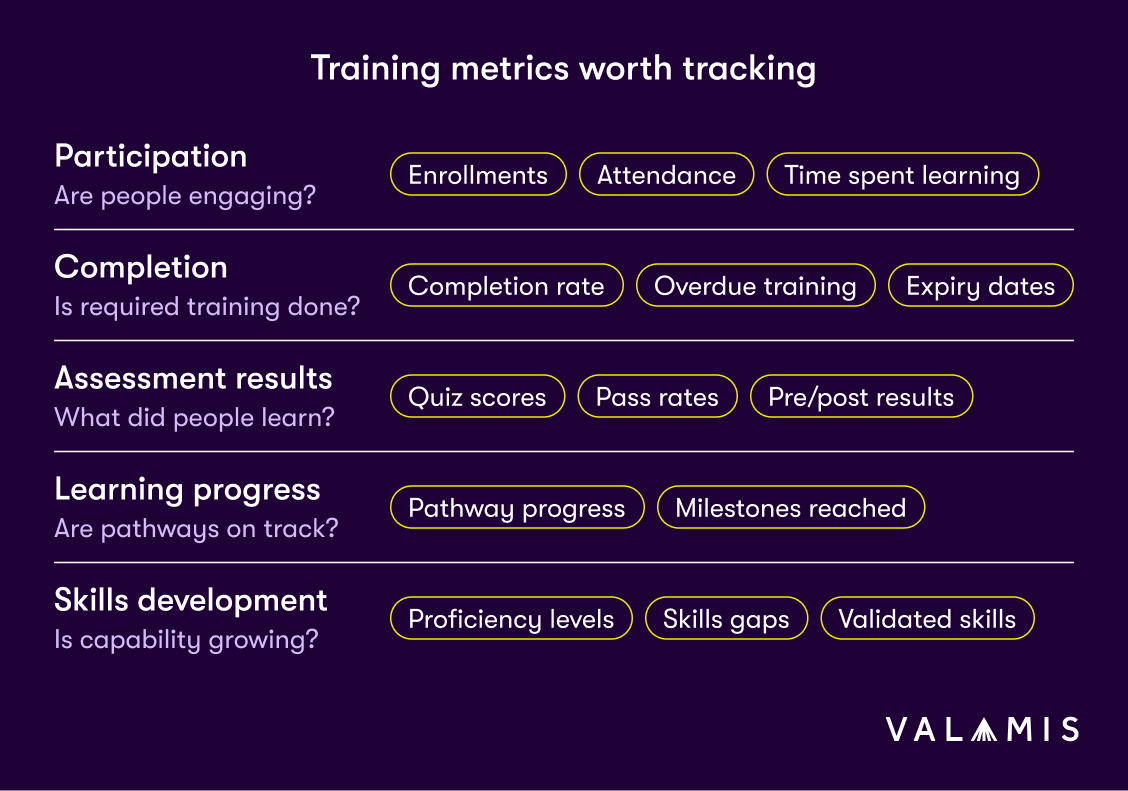
For that reason, it can be useful to think about training metrics in several categories.
Participation
Participation data helps L&D teams understand whether employees are accessing and engaging with the learning available to them.
Common measures include:
- Course enrollments
- Attendance
- Course starts
- Participation rates
- Frequency of learning
- Time spent learning
These metrics can provide a useful indication of employee engagement.
Employee engagement is closely linked to business performance. Gallup reports in its 2026 State of the Global Workplace study that low employee engagement cost the global economy around $10 trillion in lost productivity during 2025. Its research consistently links higher engagement with stronger productivity, profitability, and sales.
If participation is consistently low, L&D teams can use that as a signal to review how relevant, accessible, and engaging the learning experience is and make changes where needed.
Completion
Completion data helps organizations keep track of whether employees have finished the learning they need to complete.
This can include:
- Course completion rates
- Incomplete training
- Overdue training
- Mandatory training status
- Certification status
- Certification expiry dates
- Recertification requirements
These records are particularly important for compliance training, where organizations may need to demonstrate that employees have completed specific requirements.
Tracking expiry dates also helps L&D teams act before a certification lapses rather than discovering the problem afterward.
Using your LMS to automate this process can reduce the administrative work involved in manually maintaining training records and sending reminders.
Motorsport UK does this for volunteer accreditation rather than employee training, though the tracking requirement is the same. Completions write back to its membership system and release a license automatically, so the training record and the qualification it grants never drift apart. Every completion and update is recorded across roles and events, which gives it an audit trail alongside the completion data.
Assessment results
Assessments provide information about what employees have understood or demonstrated as part of the learning process.
This may include:
- Quiz scores
- Test results
- Pass rates
- Practical assessments
- Simulations
- Pre- and post-training assessments
- Certification exam results
The type of assessment should reflect the type of learning.
A multiple-choice quiz may be appropriate for checking knowledge of a policy, while a simulation or practical task may provide better evidence for a capability that employees need to demonstrate in their work.
Pre- and post-training assessments can help L&D teams measure how much employees have learned by comparing their knowledge or skills before and after the training.
Learning progress
With development increasingly taking place over time, tracking progress across a whole program is becoming more important. LinkedIn‘s 2025 Workplace Learning Report found that 91% of L&D professionals agree continuous learning is more important than ever for career success.
Onboarding, leadership development, and upskilling initiatives may involve a combination of courses, assessments, practical activities, coaching, or certifications over an extended period.
In these situations, tracking progress through a learning pathway can provide a clearer view of how employees are developing.
Useful measures may include:
- Percentage of a pathway completed
- Activities completed
- Milestones reached
- Time taken to progress
- Assessment performance at different stages
This can help L&D teams identify employees who are progressing as expected as well as those who may need additional support.
Skills development
Organizations may also choose to connect training records with skills data.
This provides a broader view than course completion alone because it allows L&D teams to see how learning relates to the capabilities employees need for their roles.
Useful information might include:
- Current proficiency
- Target proficiency
- Skills assessments
- Progress against role requirements
- Identified skills gaps
- Manager-validated skills
- Skills gained through learning
A skills gap analysis can help organizations understand where development is most needed.
Connecting skills and training data can then make it easier to see whether employees are progressing toward those capability requirements.
What are the main ways to track employee training?
Organizations can track employee training in several ways.
Learning management systems
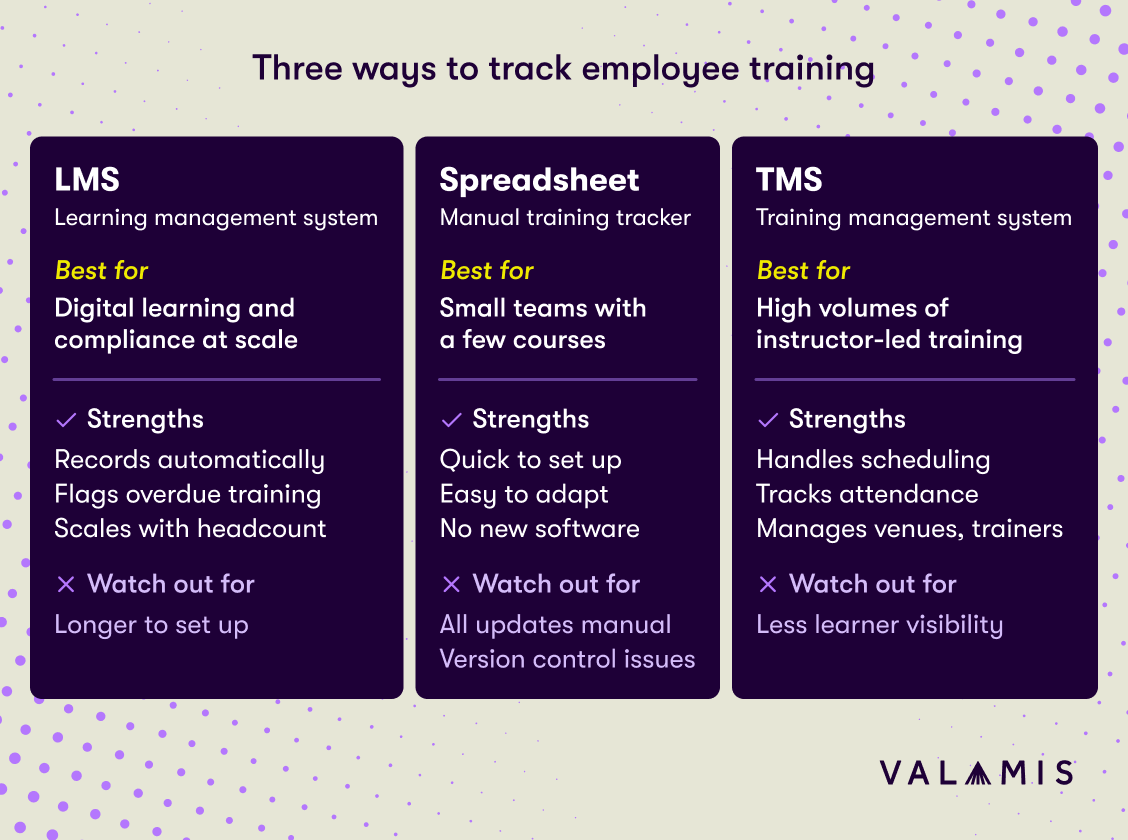
A learning management system is one of the most common ways to manage and track employee training.
An LMS can automatically record information such as:
- Enrollments
- Course starts
- Completions
- Assessment results
- Learning history
- Certifications
- Due dates
- Learner progress
This gives L&D teams a central place to manage training records and reduces the amount of manual administration required.
For organizations delivering mandatory learning, an LMS can also make it easier to identify overdue training and maintain accurate completion records.
An LMS is particularly useful when training is being delivered at scale and organizations need consistent records across a large workforce.
- Records enrollments, completions, and assessment results automatically
- Keeps training records in one central place
- Makes overdue mandatory training easy to identify
- Scales consistently across a large workforce
- Takes more time to set up than a spreadsheet
- May be more than a very small team with only a few courses needs
Spreadsheets and employee training trackers
Spreadsheets remain a practical option for smaller organizations.
A basic employee training tracker might include:
| Employee | Department | Training | Due | Status | Score | Certification expiry |
|---|---|---|---|---|---|---|
| Employee A | Finance | Data security | 30 Sep | Complete | 92% | Sep 2027 |
| Employee B | Sales | Data security | 30 Sep | In progress | ||
| Employee C | Operations | Manual handling | 15 Sep | Overdue | Expired Aug 2026 |
The main advantage of a spreadsheet is that it is simple to set up and easy to adapt.
However, the amount of manual work increases as training activity grows.
L&D teams may need to update records individually, check deadlines, send reminders, and make sure everyone is working from the same version of the file.
Spreadsheets can therefore work well at a smaller scale, but organizations should review whether they remain practical as their training requirements become more complex.
- Quick and simple to set up
- Easy to adapt to your own requirements
- No new software needed
- Every record, deadline, and reminder is handled manually
- Hard to keep everyone working from the same version
- Becomes difficult to maintain as training activity grows
Training management systems
A training management system can be useful for organizations that run a large amount of scheduled or instructor-led training.
These systems typically focus on the administration of training and can help manage areas such as:
- Course schedules
- Registrations
- Attendance
- Trainers and instructors
- Venues
- Session capacity
- Training records
This can make a TMS a good option for organizations that need to coordinate classroom training, workshops, or other scheduled learning across multiple groups.
However, a TMS is mainly designed to manage training logistics, so it may provide less visibility into individual learner progress and development than an LMS.
- Built for scheduling, registrations, and attendance
- Manages trainers, venues, and session capacity
- Suited to large volumes of instructor-led training
- Focused on logistics rather than learning outcomes
- Less visibility into individual learner progress than an LMS
Which is the best way to track employee training?
The best approach depends on the type and volume of training you manage, as well as how much automation and reporting your L&D team needs.
A few factors can help you decide.
Consider the size and complexity of your training
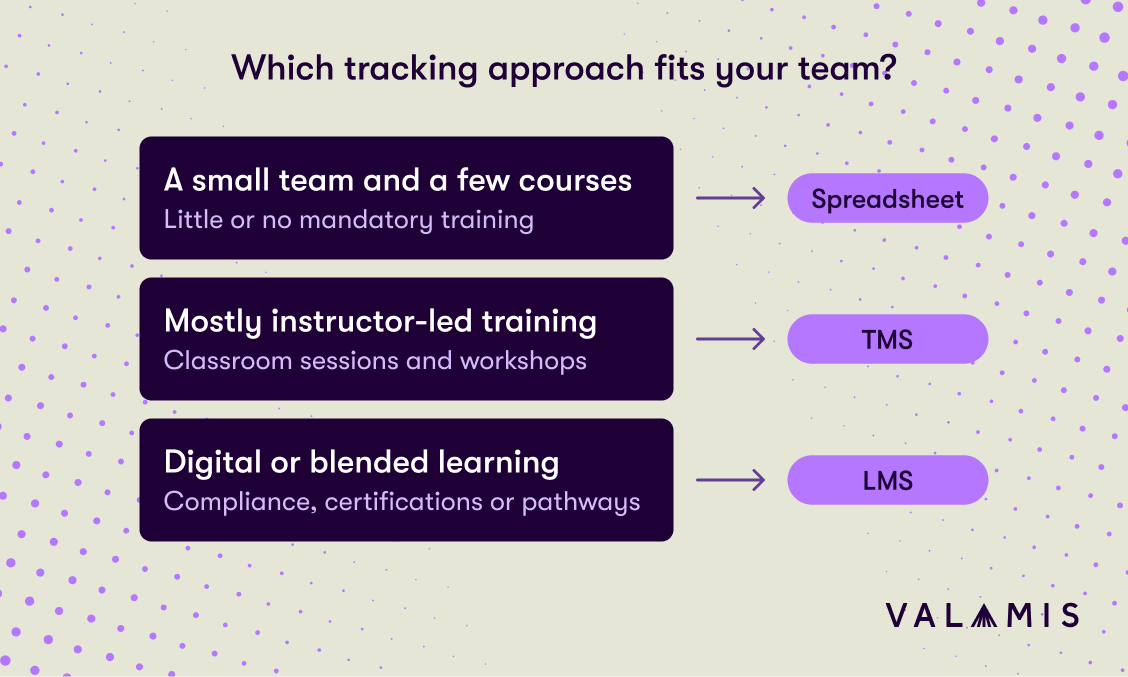
If you only need to track a small number of employees and courses, a spreadsheet may be enough.
As the number of learners, training programs, certifications, and learning requirements increases, manual tracking becomes harder to maintain accurately.
At that point, an LMS or training management system can reduce administration and make records easier to manage.
Think about the type of training you deliver
The format of your training is also important.
If most of your learning takes place through classroom sessions, workshops, or instructor-led courses, a training management system may be useful for managing schedules, registrations, attendance, and other logistics.
If you deliver digital or blended learning and need to track course progress, assessments, certifications, and learning pathways, an LMS will usually be a better fit.
Look at your compliance requirements
Organizations with mandatory or regulated training generally need more reliable tracking than a spreadsheet can provide at scale.
Features such as automated assignments, deadline reminders, recertification workflows, and completion records can make it easier to keep employees up to date and provide evidence of training when required.
Decide how much administration you want to manage manually
Spreadsheets are simple to set up, but they rely on people keeping them current.
If your L&D team spends a lot of time updating records, checking deadlines, sending reminders, or compiling reports, it may be worth moving to a system that can automate these tasks.
Consider the reporting you need
Think about who needs access to training information and what they need to see.
A simple spreadsheet may provide enough visibility for a small team. Larger organizations may need to filter training data by department, role, location, or program, or give managers access to information about their own teams.
In these cases, the reporting capabilities of an LMS or TMS can make training data easier to use.
Plan for how your training needs may change
It is also worth considering whether the approach you choose will still work as your organization grows.
A spreadsheet that works well for 50 employees may become difficult to maintain with 500. Likewise, an organization that currently delivers mainly instructor-led training may later introduce more digital learning or structured learning pathways.
Choosing an approach that can support future requirements can help avoid having to rebuild your tracking process as your L&D strategy develops.
How Valamis helps organizations track employee training
Valamis gives L&D teams a central place to track enrollments, completions, assessment results, certifications, due dates, and progress through learning paths.
For mandatory training, automated reminders and recertification workflows can help teams stay on top of overdue learning and expiring certifications.
Valamis also connects training records with skills data, giving organizations a clearer view of how learning supports employee development and workforce capability.
Frequently asked questions
What is the best way to track employee training?
A learning management system, for anything beyond a handful of courses, because it records enrollments, completions, assessment results, and certification dates automatically. A spreadsheet can be enough for a small number of employees and courses. A training management system suits organizations running a large volume of scheduled or instructor-led sessions.
Can you track employee training in a spreadsheet?
Yes, and many smaller organizations do. An employee training tracker in Excel or Google Sheets usually includes the employee name, department, course, due date, status, assessment score, and certification expiry date. The limitation is manual effort, which grows with every additional learner, course, and renewal date.
What should an employee training record include?
At minimum, who completed the training, which course, when it was completed, and whether any certification attached to it expires. Organizations with regulated training usually also record assessment results, due dates, and recertification requirements so they can evidence compliance when asked.
How do you track mandatory compliance training?
Assign the training to the employees it applies to, record completion against a due date, and monitor certification expiry so renewals happen before a qualification lapses. An LMS can automate the assignment and the reminders, which removes most of the manual chasing.
See Valamis in action
Book a call and we’ll walk through the platform against your own requirements.
Book a demo